How AEO, GEO, And HubSpot Work Together
A few years ago, SEO strategy meant rankings, snippets, and the never-ending battle for that top organic position. Today, half your buyers type their question into Google and never click anything. The other half are quietly asking ChatGPT, Gemini, or Perplexity what they should do next.
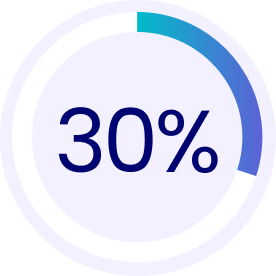
Google’s AI Overviews now appear for roughly 30% of U.S. desktop keywords, and when those summaries show up, click-through rates fall off a cliff compared to traditional results.
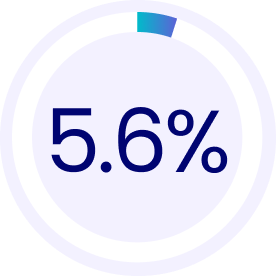
At the same time, AI-powered tools like ChatGPT and Perplexity already capture around 5.6% of U.S. desktop search traffic, more than double what they had a year ago.
So the question shifts from “How do we rank for this keyword?” to “How do we become the answer AI pulls in?”
That’s where Answer Engine Optimization (AEO), Generative Engine Optimization (GEO), and a well-tuned HubSpot portal start to matter.
Untangling The Acronyms: SEO, AEO, And GEO
SEO
Traditional SEO is still the base layer.
You still need:
- Fast, crawlable pages
- Logical site architecture and internal links
- Real topical authority around core themes
That foundation tells search engines the site is legit and worth surfacing.
AEO
AEO (Answer Engine Optimization) sits on top of that. It focuses on helping systems like Google AI Overviews, voice assistants, and featured snippets extract a precise, trustworthy answer to a specific question.
This can include:
- Clear question-and-answer structures
- FAQ and HowTo schema
- Short, direct explanations that can be quoted without butchering your meaning
GEO
GEO (Generative Engine Optimization) zooms out again. Now we care about how large language models (LLMs) like ChatGPT, Gemini, and Perplexity understand your brand across many questions, not just one.
That means:
- Clean, consistent entity signals about your company, products, and people
- Content with real experience, data, and trade-offs
- Enough depth that AI tools can stitch together a narrative about you with confidence
HubSpot ties all three together by giving you the infrastructure to publish structured content, track AI referrals, and adjust based on what’s working.
What AEO Looks Like On A HubSpot Site
On a HubSpot website, AEO is less about chasing one magic schema tag and more about turning your high-intent pages into clean, structured answers.
Here’s what that looks like in practice.
1. Start With Question-First Architecture
Most teams still build pages around product categories or internal org charts. This helps both search engines and AI models see that you’re the one who consistently answers a given set of queries.
For AEO, you regroup around buyer questions:
- “How does [solution] work for [industry/use case]?”
- “What does it cost to [solve problem]?”
- “What is the difference between [option A] and [option B]?”
Inside HubSpot Content Hub, that usually means:
- Mapping pillar pages to big, recurring questions
- Creating supporting blog posts that answer specific sub-questions
- Using topic clusters and internal links to keep those relationships clear
2. Make Each Key Page AI-Scannable
On your highest-value pages, structure content so an AI system can grab a coherent answer without guessing. HubSpot’s Content Hub makes this easier by letting you templatize content types and enforce a consistent page structure across articles, landing pages, and FAQs.
A simple pattern that works well:
- Lead with a short snapshot paragraph in plain language that answers the core question
- Follow with sections that explain how, when, and for whom this applies
- Keep paragraphs tight and descriptive, and use subheads that echo real queries
3. Add The Schema Layer Once, Use It Everywhere
The schema story is less glamorous than AI agents, but it is extremely practical. Done well, this is “set and scale” work. Your team keeps writing like humans, while the system quietly ships structured data with every publish.
You can:
- Build blog and landing page templates that include Article, FAQPage, or HowTo schema right in the HubSpot theme
- Mark up organization, product, and service pages to clarify who you are, what you sell, and where you operate
- Use FAQ modules for common questions instead of burying them in long paragraphs
GEO: Beyond “Showing Up” To Shaping Your Narrative
GEO is where things get more strategic. Here the goal is not only to appear in AI answers, but to shape how those answers talk about you.
HubSpot’s AI Search Grader (LMO/AEO Grader) is useful here. It analyzes how AI engines like ChatGPT, Perplexity, and Gemini describe your brand, how often you’re mentioned, and how you stack up against competitors.
When you combine a tool like that with what you already know from HubSpot’s CRM and analytics, you can start to:
- See which positioning points AI engines keep repeating about you
- Spot gaps where your competitors are being cited instead
- Identify topics where you are invisible, even though you have strong offerings
GEO optimization then turns into a content and PR program where you are essentially feeding the model a cleaner, richer dataset about your brand than your competitors are:
- Create in-depth, first-hand guides on those missing topics
- Publish case studies with clear numbers and outcomes
- Get quoted on third-party sites that AI tools already trust
- Keep product and pricing explainers up to date, with realistic ranges and caveats
A Practical AEO + GEO Playbook
You Can Run In Your Portal
Let’s pull this together into a concrete sequence you can actually execute.
Content Hub And Themes
- Standardized templates with baked-in schema
- Pillar/cluster structures that match your main questions and offerings
- AI-assisted drafting for outlines and first passes, followed by human editing for depth, nuance, and proof
AI Visibility And Traffic Analytics
On the measurement side, you have two key pieces:
- AI visibility tools like HubSpot’s AI Search Grader or similar platforms to understand how you are represented in AI responses
- HubSpot Traffic Analytics and custom properties to track AI referrals (ChatGPT, Perplexity, Gemini, etc.) as their own source, instead of lumping them into generic “referral” or “organic” buckets
That combination gives you a feedback loop of how you appear, how often you are clicked, and what happens in the CRM when those visitors land.
Workflows, Lists, And Personalization
Once AI-sourced visitors are identifiable, HubSpot does what it has always done well:
- Separate nurturing paths for AI-referred leads vs traditional organic or paid
- Smart content that adjusts messaging based on how someone arrived
- Reporting that shows, for example, whether AI-sourced leads close at a higher rate or require different sales enablement
Turning HubSpot Into Your Control
Room For AI-Ready SEO
So how does all of this feel inside a real HubSpot portal instead of on a whiteboard? A few building blocks matter most.
STEP 1: Baseline your AI presence
Run an AI visibility audit through HubSpot’s AI Search Grader or a comparable tool. Document:
- Where you appear
- How AI engines describe you
- Which competitors show up in your space
Pair that with Search Console, Semrush, or similar data around AI Overviews and ranking changes.
Step 2: Pick three “must win” question themes
Choose a small set of question clusters tied to revenue:
- “Best [solution] for [industry]”
- “[Problem] checklist for [role]”
- “[Product category] pricing for [segment]”
Map what you already have in HubSpot for each cluster and where the gaps live.
Step 3: Rebuild one pillar in an AI-ready format
For each theme, bring one pillar up to a modern AEO/GEO standard:
- Snapshot answer at the top
- Short, clean sections from the buyer’s perspective
- Embedded proof (screenshots, testimonials, numbers, short videos)
- FAQ or HowTo schema baked into the template
Step 4: Wire up measurement
Inside HubSpot:
- Create custom dashboards tracking AI referrals, form fills, and pipeline from AI-tagged sessions
- Flag contacts whose first touch came from AI sources
- Add a simple property or field in discovery call notes: “Mentioned AI search in their journey?”
Step 5: Expand what works
Once you’ve proven impact on one or two themes, you can:
- Roll the same structure and schema into other pillars
- Coordinate PR and guest content specifically around the questions where you still lack citations
- Use Content Hub’s remix features to push those same answers into email, social, and sales enablement content without re-writing everything from scratch
Where Vonazon Fits In
Teams rarely fail here because they don’t care about SEO anymore. They fail because this is now three overlapping problems:
- Classic SEO and technical health
- AEO/GEO content strategy and brand positioning
- HubSpot configuration, data, and reporting
As a HubSpot Elite Solutions Partner, Vonazon lives in that Venn diagram:
- We audit your current SEO, schema, and AI visibility posture
- We map your real buyer questions into a pillar and cluster strategy that works inside HubSpot
- We build or refine your Content Hub themes so every new page ships with the right structure and schema
- We configure dashboards, properties, and workflows so AI-sourced traffic shows up clearly in your reporting, instead of hiding in the noise

If you want help turning “AEO and GEO” from acronyms into pipeline, let’s talk.
We’ll walk your existing HubSpot portal, show you where AI search is already touching your brand, and build a playbook to help you become the answer buyers see in both Google AI and their favorite chatbot.