
HUBSPOT DATA HUB

Data Software That Grows With You

As your business grows, so does the volume and complexity of your data. HubSpot Data Hub brings that data together, cleans it, and keeps it in sync so every system and team works from the same source of truth. Evolved from HubSpot’s former Operations Hub, Data Hub adds richer modeling, stronger automation, unified sync, and scalable governance. Paired with Vonazon’s HubSpot Elite expertise, you gain a more aligned, agile, and AI-ready foundation across your entire CRM.

Operations Hub Hero Iso

WHY USE HUBSPOT DATA HUB?

Improved Data Accuracy

HubSpot Data Hub provides a centralized platform for managing all aspects of data, including storage, integration, and synchronization. This delivers a single source of truth for all data, which improves consistency, accuracy and accessibility across teams and systems.

Automate repetitive tasks and workflows, such as data sync, lead routing, and sales processes to reduce errors, improve efficiency, and free up resources to focus on more strategic initiatives.

Data Hub is designed to scale with businesses as the grow and evolve. Whether you’re a startup or large enterprise, HubSpot delivers the scalability and flexibility needed to adapt to changing needs, processes, and workflows.

Just getting started?

Watch the Hubspot Data hub demo

Check out this short demo video to see the latest Data Hub capabilities including Data Studio, unified sync, programmable automation, and data curation in action. Watch how this powerful toolset empowers your business with a unified view of every customer interactions, enabling your team to deliver tailored customer experiences that exceed expectations.

CTA Ready To Launch Content Hub

READY TO LAUNCH Data HUB?

Let’s tackle your challenges head-on.

KEY Data HUB FEATURES

Operations Hub Data SyncIcon

Data Sync

HubSpot’s data sync ensures your data is consistent and up-to-date across all HubSpot software and beyond. Seamlessly integrate with tools like Salesforce or Zapier, and automatically detect changes for immediate updates. Choose between one-way or two-way syncs to achieve the best data flow for your business, fully customize your sync with field mapping, and sync both newly created and historical data, and more governance controls to ensure everything is accurately aligned.
Operation Hub Automation Icon

Programmable Automation

“Use programmable automation and workflow extensions in HubSpot Data Hub to build advanced business logic that connects your apps, data, and processes. Execute secure JavaScript or Python actions directly inside HubSpot’s workflow engine, creating powerful automations without sending sensitive data to outside services. From enriching records and transforming data to triggering actions across your tech stack, Data Hub gives your team a flexible, AI-ready automation layer that keeps everything aligned and running smoothly.
Operations hub Data Quality Icon

Data Quality Automation

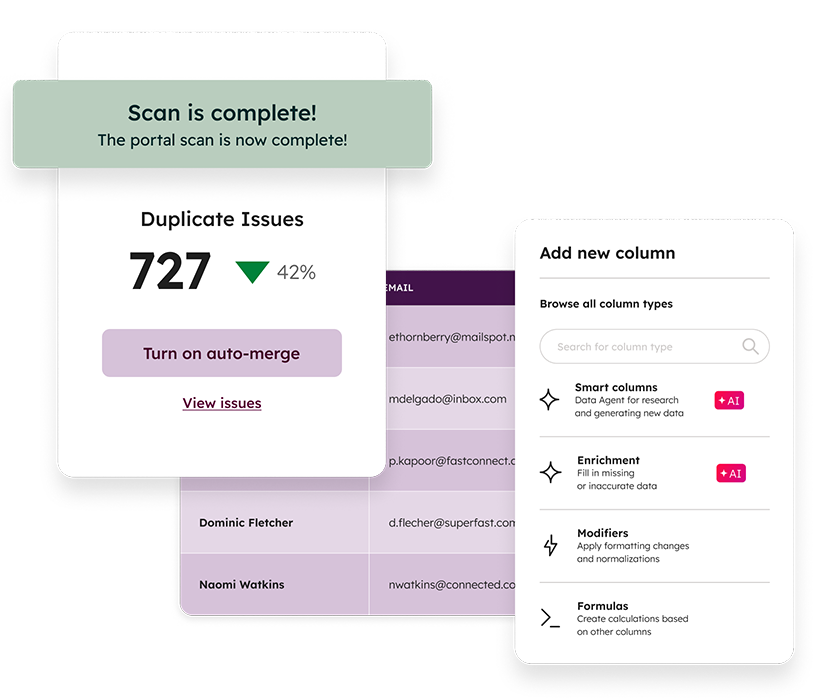
Data Hub’s automated data quality rules clean and standardize your records at scale, keeping your CRM accurate and ready for reporting, automation, and AI. Detect inconsistencies, fix formatting issues, deduplicate contacts and companies, and surface property-level problems before they create downstream errors. Use the Data Command Center to monitor data health, track integration issues, and manage schema governance. Paired with HubSpot’s data model tools, you gain a clear view of how your data is structured and how it flows through every hub.
Operations Hub Data set Icon

Datasets

Datasets give your team a governed, reusable layer of clean data that keeps reporting consistent across every dashboard. Curate fields, apply filters, and build calculated metrics in one place so teams work from the same trusted definitions — whether they’re measuring funnel performance, sales velocity, or engagement trends. By preparing data once and reusing it everywhere, ops teams save time and deliver clearer insights across the business.

YOUR QUESTIONS, ANSWERED: HUBSPOT Data HUB FAQS

What is HubSpot Data Hub?

HubSpot Data Hub unifies, cleans, and governs your customer data so every HubSpot Hub — Marketing, Sales, Service, Content — runs on a consistent, trusted source of truth. It includes data sync, data quality automation, datasets, programmable automation, and Data Studio modeling. Data Hub evolved from HubSpot’s former Operations Hub and now serves as the core data foundation for powerful automation, reporting, and AI.

Yes. Every HubSpot Hub runs on the same Smart CRM foundation, which means Data Hub connects directly to Marketing, Sales, Service, and Content Hubs. Data Hub also orchestrates your external systems through integrations, sync, and workflow extensions so all your customer data stays unified and actionable.

The key features of Data Hub include:

  • Programmable automation to code custom automation actions for any business process.
  • Workflow extensions to trigger actions like Slack messages, Zoom invites, or Asana tasks from your HubSpot workflows.
  • Governance tools like field mappings, property controls, and sandbox environments.
  • Datasets to save time and streamline your reporting with data collections and advanced calculations.
  • Warehouse integrations and reverse ETL options that connect HubSpot to Snowflake and other enterprise data sources.
  • Custom report builders to create compelling visualizations of all your CRM data in one central location.

Data Hub offers Free, Starter, Professional, and Enterprise tiers following HubSpot’s standard pricing model. Each tier adds more automation, governance, data modeling, and integration capabilities. Pricing varies by seat and HubSpot’s monthly or annual structure. For accurate pricing, Vonazon helps clients map the right tier to their data strategy, integrations, and AI goals.

Data Hub includes built-in guidance and preconfigured tools, so you can begin syncing and standardizing data quickly. However, businesses with multiple systems, custom processes, or AI initiatives benefit from expert implementation. Vonazon’s HubSpot Elite team builds your data model, integrations, quality automation, datasets, and governance so you can fully activate Data Hub across every HubSpot Hub.

What is the difference between the automation features in Operations Hub and the automation features in HubSpot’s other products?

Operations Hub has two unique automation features: programmable automation and data quality automation.

With programmable automation, write JavaScript or Python directly in HubSpot workflows to automate even the most advanced business processes.

And with data quality automation, clean up your data — capitalize names, fix date properties, and more — to align your company and improve personalization in your customer experience.

Programmable automation is currently a feature in Operations Hub Professional edition that allows you to create customized automation actions using JavaScript or Python to cover your specific business processes and needs.

Unlike out-of-the-box integrations, programmable automation is fully customizable and you can tailor it to perfectly fit your business. It’s also built right into HubSpot Smart CRM, which means you don’t have to build automation software from scratch and your data isn’t exposed to third-party servers unnecessarily.

Programmable automation is part of Operations Hub and is included in the Professional edition.

With data inputs and updates coming from many sources in a CRM, it can be tough to monitor and fix potential issues with records, properties, and integrations.

Data quality tools automatically clean and organize your database, so you can spend less time reacting to problems as they appear and more time using your data to make smart business decisions. HubSpot provides data quality tools that help you set up your data model quickly and correctly, keep bad data out of your database, and monitor your data health.

HubSpot offers the following data quality features for free:

  • Data model overview: A visual representation of your data model so you can understand how your data is stored in HubSpot and how it all connects.
  • Property validations: Control how reps enter data into your CRM for fewer inconsistencies that may lead to friction.
  • Import error handling: Discover errors during the import process and fix them on the fly.

HubSpot offers the following data quality features in paid editions of Operations Hub:

  • Data quality command center: Monitor and clean potential issues with your properties, records, and data health in one centralized location.
  • Format data actions: Cut down on manual data entry and human error with format data actions that automatically enhance your data.
  • Duplicate manager (bulk): Use AI to find and fix duplicate contact and company data — all from the data quality command center.
What is team management and permissions?

Team management and permissions are HubSpot’s user permission tools utilized to control access across areas of the HubSpot customer platform such as records, content, and tools to keep your teams more focused and efficient.

HubSpot’s user permission tools are a great fit for any business that has multiple users working in a single tool. User permissions make any sized scaling team more efficient and secure by organizing and restricting access to data.

Benefits of utilizing HubSpot team management and permissions include:

  • Easily define who can access key business data and processes.
  • Manage ongoing permission changes in one central location.
  • Audit user activity and adjust permissions as needed.
  • Keep your teams organized and efficient by granting every user access to the right assets.

Common features used when utilizing user permissions are:

  • Teams: Organize users into groups to streamline your business processes.
  • Permission sets: Quickly configure user permissions and see faster activation rates.
  • Audit logs: Monitor user activity and easily troubleshoot issues as they arise. 

You can get started with user permissions in HubSpot for free. Advanced permissions functionality is available in certain premium editions of Marketing Hub, Sales Hub, Service Hub, CMS Hub, and Operations Hub. If you need any assistance getting started or setting up advanced functionality in HubSpot user permissions, contact the expert HubSpot Elite team at Vonazon.

What are datasets in HubSpot Operations Hub?

Datasets curate your HubSpot data into approachable collections to save your ops team time, and enable fast, easy, consistent reporting.

The primary features of datasets in HubSpot include:

  • Save your ops team time by easily running your own reports.
  • Calculate values directly within reports to gain deeper insights.
  • Sync your HubSpot data to Snowflake.

The key to great reporting is the data that powers it. Operations Hub is all about data. It connects, cleans, and curates customer data, which makes powerful reporting possible. Datasets are the “curation” piece — they enable you to create collections of data that serve as jumping-off points for reporting.

The feature that actually builds the reports — the custom report builder — is available in Professional and Enterprise editions across all HubSpot products.

Datasets can include any data that’s stored in HubSpot’s AI-powered Smart CRM — contacts, companies, deals, custom objects, sales activities, behavioral events, and more. Datasets cannot pull tables directly from third-party data sources.

BUILD A SOLID DATA HUB STRATEGY

A well-structured RevOps strategy is the foundation for success in today’s competitive digital landscape. Our expert team works with you to leverage the power of HubSpot’s Data Hub to optimize and streamline your business processes, ensuring seamless data synchronization, task automation, and enhanced collaboration across departments. From seamlessly managing customer data to orchestrating intricate workflows, we create a tailored strategy that aligns with your business objectives. With our expertise, your business gains the efficiency and agility it needs to excel, backed by a robust operations framework that drives growth and innovation.

Operations Hub Elite Assistance Icon

HubSpot Elite Assistance

Our team knows all the Data Hub framework and tools. We’ll share them all with you so you can fully utilize all the powerful tools and features HubSpot offers.

Operations Hub Time Icon

SAVE VALUABLE TIME

Time is money. Let us handle the tricky integrations and data migrations while you focus on the core operations of your business.

Operations Hub Target Icon

TAILORED SOLUTIONS

The HubSpot Data Hub is extremely customizable. Allow our experts to configure your Hub to support your goals.


Working Together to Help You Grow Better

Data Hub seamlessly connects with other HubSpot hubs to help simplify your operations and supercharge growth. Your data is automatically connected when you use two or more hubs together, enabling you to easily track your entire customer journey from start to finish.

WHY WORK WITH VONAZON?

HUBSPOT CERTIFICATIONs
0 +
COMPLETED ONBOARDINGS
0 +
CRM Implementations
0 K+
Five Star Reviews
0 +
Integrations & Migrations
0 K+

OUR HUBSPOT RESOURCES

ChatbotAI-Guide

HubSpot AI Chatbot: 100+ Prompts to Jump Start Your Chatbot 

Content Hub Featured Image

The Ultimate Guide to HubSpot Content Hub: Boost Your Marketing Strategy

account based marketing playbook guide

The Ultimate ABM Playbook: Winning Strategies You Can Master

OUR FEATURED PARTNERS

diamond partner deal hub
diamond partner rollworks
diamond partner air call
diamond partner pandadoc
diamond partner call rail
diamond partner clear bit
diamond partner shopify
diamond partner chili piper
CTA Ready To Launch Content Hub

LAUNCH DATA HUB TODAY

Need more information? Sign up for our newsletter for the latest on HubSpot marketing strategies.