
Best CRM Migration Services for B2B Teams
Table of Contents
Key Takeaways
- For multi-system B2B teams, records are the easier part of a migration. The harder work is reconnecting workflows, integrations, lifecycle stages, and reporting across the CRM, marketing automation, and ERP layers.
- Data quality is the most cited risk. A 2026 SyncMatters benchmark reports that 67% of organizations find major data quality issues mid-migration, 54% experience significant delays, and 43% report problems lasting beyond six months after launch.
- Data moves; automation and integrations generally do not. Records can be imported, but workflows, email templates, approval processes, and ERP connections are typically rebuilt. See the infographic below for the full split.
- Timelines vary widely. Published guidance ranges from about six to twelve weeks for many mid-market Salesforce-to-HubSpot projects to several months for complex ones. Object count, customization, and the number of connected systems drive the range.
- No single provider fits every situation. Vonazon suits multi-system consolidations with ERP integration, SmartBug Media suits broad source-platform coverage, New Breed suits migration paired with go-to-market redesign, Huble suits regulated or multi-region programs, RevPartners suits compressed timelines, and Blend suits combined website and CRM moves.
- Migration is not always the answer. Some teams keep Salesforce as the CRM and connect HubSpot to it, so the decision to migrate deserves its own check.
If a team runs marketing automation on one platform, CRM on another, and reporting through a third, the central migration question is rarely how to move records from A to B. It is how to reconnect the operating model underneath them. Vonazon provides CRM and marketing platform migration services for that kind of complexity, consolidating fragmented systems into a connected HubSpot environment.
This guide compares six providers for multi-system B2B teams, with mid-market and enterprise HubSpot teams in mind: organizations running Salesforce alongside Marketo, Pardot, Dynamics, or legacy tools. It also covers what a migration involves, where projects go wrong, and when another approach may fit better.
Quick guide: 6 CRM migration services for multi-system B2B teams

Suited to B2B teams consolidating multiple systems, including ERP connections, into HubSpot

Suited to teams moving several platform types at once (marketing automation, CRM, CMS, customer service)

Suited to teams that want migration paired with go-to-market process redesign

Suited to multi-region or regulated organizations that need ISO 27001 documentation

Suited to growth-stage teams that prioritize speed

Suited to organizations migrating a website and CRM together
Fit depends on the stack, timeline, and compliance needs, not on a single ranking
If the situation is... | Consider... | Check before committing |
|---|---|---|
Salesforce, marketing automation, and ERP consolidating into HubSpot | Vonazon | HubSpot-only focus; discover phase adds time before data moves |
Many source platforms at once (Marketo, Pardot, Eloqua, Zendesk, CMS) | SmartBug Media | Confirm migration specialists are staffed; fewer public multi-system case studies |
Migration plus go-to-market process redesign | New Breed | Redesign scope can extend the timeline |
Regulated industry or multi-region rollout needing ISO 27001 | Huble | Enterprise positioning may exceed mid-market needs |
Urgent timeline at a growth-stage company | RevPartners | Compressed timelines may not fit enterprise multi-system validation |
Website and CRM moving together | Blend | Paired scope adds work if only the CRM is moving |
What does a multi-system CRM migration involve?
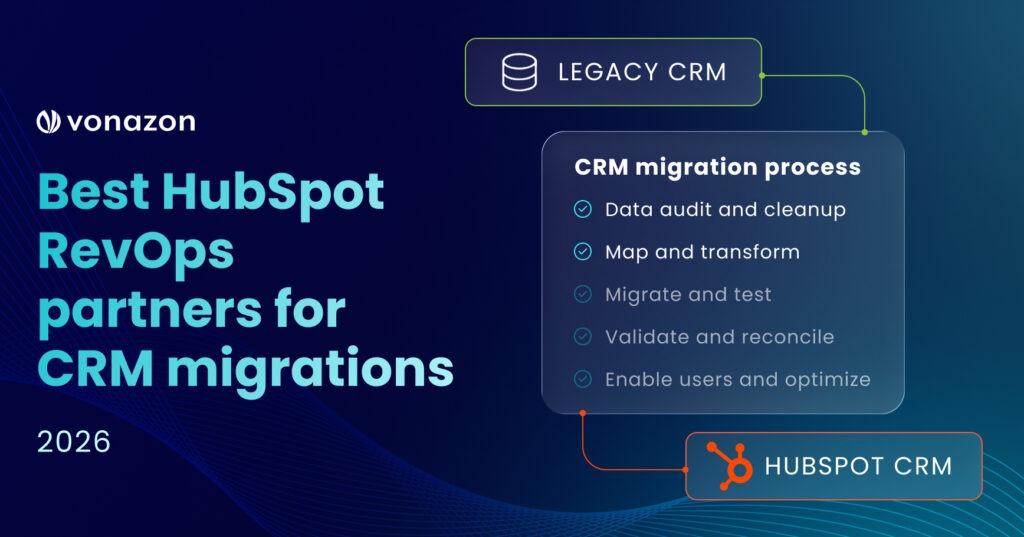
A multi-system migration follows a repeatable sequence, but each stage carries extra dependencies when marketing automation, ERP, and billing systems are involved. The audit must map every connection between systems, and the rebuild stage must restore those connections, not only the records. For a mid-market Salesforce-to-HubSpot project, INSIDEA’s published plan spans roughly six to twelve weeks, with the audit and plan first, the build in a sandbox next, cutover after that, and training last.
A common sequence; stage length varies with objects, customization, and integrations

Multi-system projects add two dependencies to this sequence:
Step 1 must map every connection between CRM, marketing automation, ERP and billing. Step 4 must rebuild those connections, not only the records. Reference range: a mid-market Salesforce-to-HubSpot plan commonly spans six to twelve weeks; ERP-connected projects depend on integration scope.
What moves with the data, and what does not?
The most common planning gap is assuming that automation moves with the records. Standard objects such as contacts, companies, and deals can be imported, and HubSpot documents a native route to import Salesforce records. Workflows, email templates, approval processes, and integrations generally need to be rebuilt, as noted in guides from Xappex and Orange142. Custom objects and their associations must be created before import, and activity history has limited import options, so teams need to decide early which history is essential.
What migrates, what needs setup, what gets rebuilt
Typical Salesforce-to-HubSpot scope; automation and integrations do not move with the data
Move with standard import
- Contacts, companies, and deals
- Standard properties and field values
- Record owners (mapped to HubSpot users)
Salesforce leads import as contacts (HubSpot has no Lead object)
Needs setup before import
- Custom objects and their associations
- Property and picklist mapping
- Load order: companies, contacts, then deals
- Activity history: import options are limited so scope with history is essential
Rebuilt, not migrated
- Workflows, flows, and process automation
- Email templates and sequences
- Approval processes (rebuilt as workflows)
- ERP, billing, and service integrations
- Dashboards and attribution reports
Scope varies by source system and setup. Confirm each item in discovery rather than assuming it transfers.
How we chose the best CRM migration services for B2B teams
Choosing a partner for a multi-platform move calls for a different evaluation than choosing one for a single-CRM move. The partner needs to map dependencies between marketing automation, CRM, and reporting systems before a single record moves. The criteria used here:
Multi-system migration capability
Can the partner migrate CRM data and marketing automation assets (workflows, nurture sequences, scoring models) in a coordinated project, or do those run as separate engagements?
Data integrity and governance
Does the team audit, deduplicate, and validate data before import? According to a 2026 SyncMatters analysis, 67% of organizations discover major data quality issues mid-migration, so pre-migration cleanup separates reliable partners from risky ones.
Integration architecture
How does the partner handle connections between HubSpot and ERP, billing, or service platforms? Vonazon’s guide to CRM integrations covers the common patterns.
Workflow and automation rebuild
Does the partner recreate existing automation logic in HubSpot, or leave the rebuild to the internal team after go-live?
Post-migration reporting continuity
Can dashboards, attribution models, and pipeline reports function on day one of the new system?
User adoption and training
Does the partner provide structured enablement for sales, marketing, and service teams?
RevOps alignment
Does the partner treat migration as a revenue operations project, connecting lifecycle stages, handoffs, and forecasting, or as a data transfer?
Teams with simpler stacks may reasonably weight speed and cost above integration depth. Teams in regulated industries may weight compliance documentation first.
The 6 best CRM migration services for multi-system B2B teams
vonazon
Suited to multi-system consolidations with ERP integration
Best for: B2B teams consolidating Salesforce, marketing automation, and ERP or billing connections into HubSpot in one coordinated project.
Less suited for: Teams moving to a platform other than HubSpot, or teams that want a self-service migration tool.
Vonazon approaches CRM migration as a system-building project rather than a data transfer. For teams running Salesforce alongside Marketo, Pardot, Dynamics, or legacy tools, the process maps integrations, workflows, and data relationships before migration begins.
Vonazon is a HubSpot Elite Solutions Partner with CRM Implementation Accreditation. In the Sol Systems engagement, Vonazon moved a fragmented Salesforce environment to HubSpot, migrated more than 250,000 records, redesigned service operations, added integrations and automations, and the client reported a 60% reduction in CRM licenses. Related work includes a Marketo to HubSpot migration and a Pardot to HubSpot migration.
The distinguishing feature for multi-system teams is the combination of CRM architecture, RevOps strategy, integration planning, and execution in a single engagement, which reduces the number of vendors to coordinate.
Features
- CRM audit and data mapping: Maps the current data structure, workflows, integrations, and reporting requirements before any record moves.
- Pre-migration data cleanup: Resolves duplicate records, outdated fields, and inconsistent properties before import.
- Automation and workflow rebuild: Recreates nurture campaigns, task assignments, lead scoring, and notification sequences inside HubSpot's workflow engine.
- Integration architecture: Connects HubSpot to ERP platforms such as NetSuite, SAP, and Acumatica, plus billing, service, and custom applications, using APIs, middleware, and native connectors. A data fragmentation case study shows this work in a live environment.
- Reporting and attribution continuity: Configures dashboards, pipeline reports, and attribution models for visibility from the first week.
- Training and adoption support: Provides enablement for sales, marketing, service, and administration teams. See Vonazon's HubSpot onboarding and ongoing HubSpot support services.
Pros and Cons
PROS
- Combines migration, RevOps, integration, and reporting in a single engagement, which reduces coordination overhead
- HubSpot Elite Partner with CRM Implementation Accreditation and 150+ combined HubSpot certifications
- Documented work on projects involving 250,000+ records and ERP integration
CONS
- Focuses primarily on HubSpot, so teams migrating to a different destination platform need a different partner
- Multi-system engagements include a discovery phase, which adds time before data movement begins
- A managed service is more hands-on than necessary for teams that prefer a self-service tool
SmartBug Media
Suited to broad platform coverage across marketing automation, CRM, and CMS
Best for: Teams consolidating several platform types at once.
Less suited for: Teams that need deep CRM architecture and RevOps redesign as the main focus.
SmartBug Media offers migration services across marketing automation platforms (Marketo, Pardot, Eloqua, Salesforce Marketing Cloud), CRM systems (Salesforce, Dynamics), customer service tools (Zendesk), and content management systems (WordPress, Squarespace). The firm holds HubSpot Data Migration Accreditation and Elite Partner status.
SmartBug follows a phased approach: object discovery and audit, property cleanup, data migration, post-migration setup, quality assurance, and go-live support. The breadth of platform coverage is relevant for teams that need to consolidate several marketing and sales tools at once.
Features
- Multi-platform migration coverage: Handles transitions from Marketo, Pardot, Eloqua, Salesforce, Zendesk, WordPress, and other systems into HubSpot.
- Data Migration Accreditation: Holds HubSpot's accreditation for data migration work, which requires demonstrating repeatable methodology.
- Inbound marketing integration: Pairs migration with content strategy and demand generation services.
Pros and Cons
PROS
- Covers a wide range of source platforms, including Marketo, Pardot, Salesforce, Zendesk, and CMS systems
- Holds HubSpot Data Migration Accreditation
- Offers marketing strategy and content services alongside migration
CONS
- Marketing-heavy positioning may mean less emphasis on deep CRM architecture and RevOps process redesign
- Large agency with a broad service menu, so teams should confirm that migration specialists staff the engagement
- Complex multi-system migrations (combined CRM and marketing automation in one project) are less documented in public case studies
New Breed
Suited to migration paired with go-to-market process redesign
Best for: Revenue teams that want to rebuild processes, not replicate the old system.
Less suited for: Teams that need the fastest possible cutover.
New Breed reports more than 500 HubSpot migrations and implementations and holds all eight HubSpot accreditations, including Advanced Implementation Certification. Its methodology centers on aligning data structures, workflows, and reporting with the team’s go-to-market motion.
The firm treats migration as an opportunity to remove technical debt. Its RevOps team designs the HubSpot environment around sales processes, marketing operations, and customer success workflows rather than copying the legacy setup.
Features
- All eight HubSpot accreditations: Covers onboarding, implementation, data migration, CRM customization, and platform consulting.
- Go-to-market alignment: Designs the HubSpot environment around revenue team processes, not only data structures.
- AI readiness focus: Structures data and automation foundations to support HubSpot's AI features after migration.
Pros and Cons
PROS
- Over 500 implementations reported, with all eight HubSpot accreditations
- Focuses on go-to-market process design alongside data movement
- Recognized by HubSpot as a North American Partner of the Year
CONS
- Publicly available documentation of ERP and multi-system integration work is limited compared to CRM-focused case studies
- Go-to-market redesign scope may extend timelines for teams that need a faster cutover
- Positioning emphasizes SaaS and growth-stage companies, so enterprise manufacturing or healthcare teams should verify relevant industry experience
Huble
Suited to multi-region programs and regulated industries
Best for: Enterprises and regulated organizations where compliance documentation is a migration requirement.
Less suited for: Mid-market teams with simpler migration scope.
Huble operates across seven countries and holds ISO 27001 and ISO 9001 certifications across all locations. The firm has delivered multi-region HubSpot deployments for organizations including GfK, Knight Frank, and Avison Young, consolidating CRM data across business units and geographies.
Huble’s delivery model follows an ISO-aligned methodology covering discovery, process engineering, architecture, implementation, migration, testing, and hypercare. That structure is relevant for financial services, healthcare, and real estate teams, where compliance documentation and security controls are migration requirements.
Features
- ISO 27001 and ISO 9001 certification: Provides documented security and quality management across all engagement locations.
- Multi-region deployment capability: Handles CRM consolidation across business units, languages, and regulatory environments.
- Structured hypercare phase: Includes post-migration governance, technical management, and continuous improvement support.
Pros and Cons
PROS
- ISO 27001 and ISO 9001 certifications provide documented compliance for regulated industries
- Operates across seven countries, supporting multi-region and multi-language deployments
- Published case studies for enterprise organizations including GfK, Knight Frank, and Avison Young
CONS
- A global delivery model may involve teams across time zones, which requires clear communication protocols
- Enterprise positioning may be less suited for mid-market teams with simpler requirements
- Marketing automation migration details (Marketo, Pardot) are less prominent in public materials than CRM-focused content
RevPartners
Suited to compressed timelines and RevOps-led migrations
Best for: Growth-stage teams that need to move quickly without carrying years of unused customization forward.
Less suited for: Enterprise-scale multi-system migrations that need extended discovery and validation.
RevPartners positions itself as a go-to-market operations firm that treats CRM migration as a step toward RevOps maturity. It offers migrations from Salesforce, Marketo, Dynamics, and other platforms into HubSpot, and its own materials describe a Salesforce migration completed in six weeks.
RevPartners audits every object and field in the source system, rebuilds only the automation that drives value, and maps the buyer journey to HubSpot lifecycle stages.
Features
- Compressed migration timelines: Reports completing qualifying CRM migrations in as few as six weeks.
- Source system audit and cleanup: Reviews every object, field, and automation in the legacy CRM to decide what migrates and what is retired.
- RevOps maturity model: Designs the HubSpot environment with a maturity framework to support ongoing process improvement.
Pros and Cons
PROS
- Reports compressed migration timelines for qualifying engagements
- RevOps maturity framework supports planning beyond the initial migration
- Source system audit identifies unused customization before migration, reducing data bloat
CONS
- Compressed timelines may not accommodate the discovery and validation needs of enterprise multi-system migrations
- Public case studies with detailed record counts and integration complexity are limited
- Marketing automation migration specifics (Marketo programs, Pardot engagement studio logic) receive less emphasis than CRM-focused content
Blend
Suited to combined website and CRM migrations
Best for: Organizations where the website migration and CRM onboarding need to happen together.
Less suited for: Teams that need only CRM and marketing automation migration.
Blend is a Diamond HubSpot Solutions Partner with more than 150 HubSpot websites launched and accreditations in CMS, onboarding, and content experience. It handles website migrations from WordPress, Drupal, Squarespace, and other platforms to HubSpot Content Hub, combined with CRM setup and marketing automation configuration.
The combined approach keeps content, forms, landing pages, and CRM data connected from the start. Blend works primarily with B2B teams in financial services, manufacturing, SaaS, and telecom.
Features
- Combined website and CRM migration: Migrates website content to HubSpot Content Hub alongside CRM onboarding so forms, landing pages, and contact data stay connected.
- HubSpot CMS accreditation: Holds content experience and CMS accreditations that verify website migration and development methodology.
- Industry focus: Works primarily with financial services, manufacturing, SaaS, and telecom organizations.
Pros and Cons
PROS
- Over 150 HubSpot websites launched, with work featured in HubSpot's Inspire Gallery
- Combined website and CRM migration keeps content and data connected from launch
- CMS, onboarding, and content experience accreditations cover both website and platform work
CONS
- CRM migration is paired with website work, which may add scope for teams that only need CRM and marketing automation migration
- Diamond is one tier below Elite in HubSpot's partner program
- Large-scale CRM data migrations (100,000+ records, multi-pipeline) are less documented publicly than website migration case studies
Comparison Table: CRM migration services for multi-system B2B teams
Partner fit depends on what is actually changing. A straightforward data move points toward migration-focused capability. A Salesforce-to-HubSpot transformation that also involves integrations, architecture redesign, lifecycle and routing changes, reporting continuity, data governance, and user adoption calls for a partner whose evidence spans all of those areas, along with a plan for ongoing optimization.
For organizations evaluating migration alongside HubSpot architecture, integrations, RevOps, reporting, and ongoing optimization, Vonazon’s revenue operations practice is one option to assess against the criteria above.
Provider | Multi-system Migration | ERP Integration (publicly deocumented) | CRM Implementation Accreditation |
|---|---|---|---|
Vonazon | ✓ | ✓ | ✓ |
SmartBug Media | ✓ | Not Found | ✓ |
New Breed | ✓ | Not Found | ✓ |
Huble | ✓ | Not Found | ✓ |
RevPartners | ✓ | Not Found | Not Found |
Blend | Limited (paired with website work) | Not Found | ✓ |
“Not found” means the item was not prominently documented in public materials reviewed in November 2026. It does not confirm the capability is absent. Verify directly with each provider.
How should a migration partner be evaluated?
The most expensive migration mistake is choosing a partner on platform familiarity alone. A partner may know HubSpot well but lack experience with the specific source systems, integration patterns, and data complexity of the team hiring them.
A practical sequence:
- Map every system that touches customer data: CRM, marketing automation, ERP, billing, service desk, and reporting tools. HubSpot’s documentation on its CRM migration process is a useful baseline for scoping.
- Ask each partner how dependencies between those systems will be handled. Partners who treat each system as a separate project introduce gaps; partners who plan a connected project reduce risk.
- Request references with a similar integration stack. A partner that has migrated Salesforce to HubSpot many times may still lack experience connecting NetSuite, SAP, or custom APIs in the same engagement. Vonazon’s Salesforce to HubSpot migration best practices outline the Salesforce-side questions.
- Ask about validation: sandbox or sample loads, post-import reconciliation, and rollback plans.
- Ask what happens after go-live: training, hypercare, and support terms.
- Check tier and track record together. HubSpot publishes the thresholds for each Solutions Partner tier, and Elite carries a minimum gross revenue retention requirement. Tier signals scale and retention, not fit for a specific stack.
How can data quality risk be reduced during a CRM migration?
Data quality is the most frequently cited risk. The 2026 SyncMatters benchmark reports that 54% of organizations experience significant migration delays, and data cleanup remains the primary bottleneck.
Share of organizations affected, 2026 benchmark data
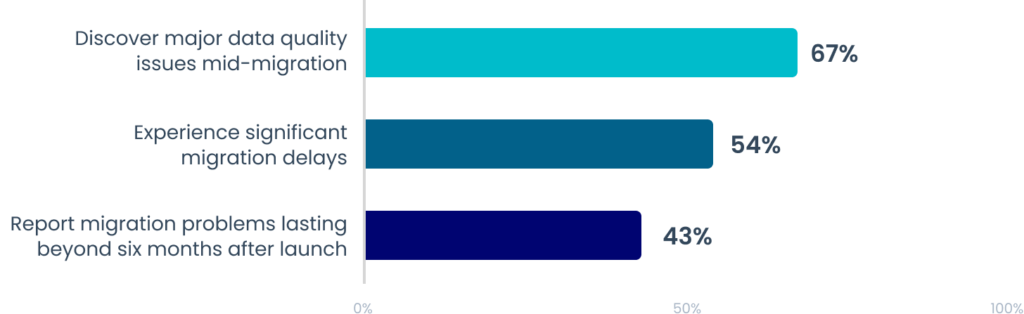
Why it Matters: problems found late are the most expensive to fix, so audit, deduplication, and validation belog before import. Share of organizations reporting each issue in the benchmark; percentages are independent, not parts of one whole.
Source: SyncMatters, ‘Why CRM Data Migration Is Still the Biggest Bottleneck in 2026’ (2026).
The most reliable approach is to clean data before it moves:
- Deduplicate contact and company records
- Standardize field values
- Retire unused properties
- Validate associations (contacts to companies, deals to line items, tickets to contacts)
- Run these steps in the source system, before import, so contaminated data does not become the foundation of the new CRM
- Reconcile record counts, associations, and pipeline values after import
Vonazon builds pre-migration cleanup, field-level validation, and post-import reconciliation into its engagements. Teams that want ongoing data hygiene after go-live can look at Vonazon’s Operations Hub services.
When might migration not be the right move?
Not every team needs a full migration. HubSpot supports connecting to Salesforce, and its documentation covers how to connect HubSpot and Salesforce and bring selected Salesforce records into HubSpot. Some teams keep Salesforce as the system of record and move only marketing automation (for example, Pardot to HubSpot Marketing Hub).
Factors that favor keeping Salesforce in place:
- Heavy, well-maintained Salesforce customization that the business depends on
- A sales organization that is satisfied with Salesforce and a marketing team that is not satisfied with the current marketing automation
- Contract or compliance constraints that make a full cutover impractical in the near term
Factors that favor consolidating on HubSpot:
- Fragmented data across systems that cannot be reported on in one place
- Licensing and administration overhead from running multiple platforms
- Unused customization that adds cost without adding value
60%
The Sol Systems engagement is an example of the second pattern, with the client reporting a 60% reduction in CRM licenses after consolidation. Results depend on the starting environment.
How to choose among the six providers
The decision usually comes down to which constraint matters most:
- Complex stack with ERP connections: prioritize providers with documented integration work, and ask for references. Vonazon is built around this scenario.
- Many source platforms at once: SmartBug Media’s breadth is relevant.
- Process redesign alongside migration: New Breed’s go-to-market focus is relevant.
- Compliance documentation or multi-region rollout: Huble’s ISO certifications are relevant.
- Speed above all: RevPartners reports the shortest timelines.
- Website and CRM together: Blend’s combined approach is relevant.
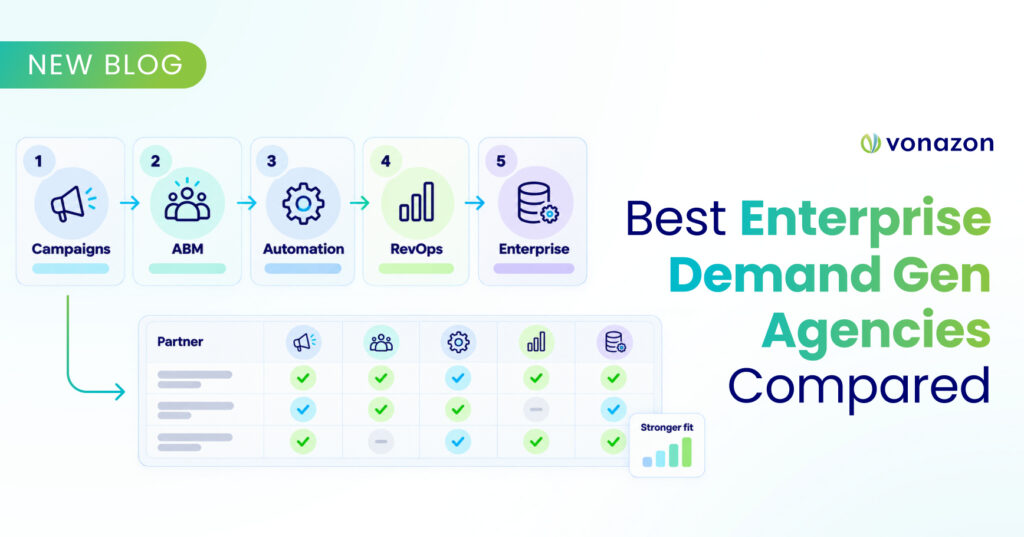
For teams whose main need is a multi-system consolidation with ERP integration, Vonazon’s migration team offers a platform evaluation to scope the project. For other needs, the table and infographic above point to alternatives worth shortlisting.
Frequently Asked Questions
What is a CRM migration service?
A CRM migration service moves customer data, workflows, automations, and integrations from one platform to another. Vonazon’s migration and integration service also rebuilds revenue operations inside HubSpot so teams have clean data, working automation, and reliable reporting from day one.
How long does a CRM migration take for a multi-system B2B team?
Published guidance varies. INSIDEA cites six to twelve weeks for most mid-market Salesforce-to-HubSpot projects, with a clean, standard-object org near the low end. Coffee cites a range from a few weeks to nine months depending on scale and workflow complexity. Projects that add marketing automation and ERP connections extend the timeline because integrations must be mapped, rebuilt, and tested. A discovery phase sets an accurate estimate before work begins.
What is the biggest risk during a CRM migration?
Data quality. Migrating dirty data creates broken reports, duplicated records, and low user adoption. The SyncMatters 2026 benchmark reports that 67% of organizations find major data quality issues mid-migration. Pre-migration cleanup, deduplication, field validation, and post-import reconciliation reduce that risk.
Can a CRM and marketing automation platform be migrated at the same time?
Yes, and a coordinated project is often more efficient than two separate ones, because lifecycle stages, lead scoring, nurture workflows, and reporting stay connected. The trade-off is a larger scope and a longer discovery phase. Vonazon’s Marketo to HubSpot and Pardot to HubSpot case studies show combined migrations.
How can a team evaluate whether a migration partner can handle its integration stack?
Request case studies or references involving the same source systems and integration patterns. A partner experienced with Salesforce-to-HubSpot moves may not have hands-on experience with ERP connections, custom APIs, or middleware. Look for partners that map every integration dependency during discovery, not after migration starts. Vonazon’s integrations guidebook outlines how that mapping works.
Can HubSpot's native import tools handle a Salesforce migration without a partner?
For smaller, standard-object migrations, possibly. HubSpot documents a native option to import Salesforce records. It covers data movement only. Automations, custom objects, integrations, and reporting need separate planning, so a managed service adds the most value as stack complexity grows.
What happens to existing workflows and automations during a CRM migration?
Automation logic generally does not transfer between platforms. Salesforce flows, Marketo programs, and Pardot engagement studio logic are documented and rebuilt in HubSpot’s workflow engine. A useful audit decides what to rebuild, improve, or retire, so the new environment carries forward only logic that still supports revenue.
Is it better to migrate fully or keep Salesforce alongside HubSpot?
It depends on how much of the business runs on Salesforce customization, whether data is fragmented across systems, and what licensing and administration cost today. Some teams keep Salesforce and connect HubSpot to it; others consolidate. A discovery phase with a neutral scoring of both options is the most reliable way to decide.



Vonazon maps every integration, workflow, and data relationship before a record moves, then rebuilds them in a single HubSpot environment. Share the current stack and get a clear view of scope, risks, and timeline.