

9 Enterprise HubSpot RevOps Capabilities for 2026
A capability guide for enterprise operations leaders connecting marketing, sales, service, data, and analytics inside HubSpot.
At enterprise scale, a single HubSpot portal rarely serves a single team. One instance often carries the marketing programs of several regions, the pipelines of multiple business units, the service queues of distinct product lines, and the reporting that finance and executive leadership depend on.
Each of those groups arrives with its own definitions, source systems, and view of what a qualified lead or an active customer really is. Where those definitions meet inside one CRM, the platform can drift from a shared operating system into a contested one, and easing that friction is much of what enterprise HubSpot RevOps services exist to do.
Performance at this scale depends less on which features a company has bought and more on how its architecture, governance, processes, automation, integrations, and measurement hold together under load.
75%
The nine capabilities below work as parts of one system rather than a menu of tools. Each section looks at what a capability covers, why it matters as complexity grows, which teams rely on it, and what tends to break when it is weak.
Table of Contents
1. CRM Architecture and a Data Model Built for Scale
2. Data Governance and Quality Management
3. Lifecycle and Lead Management
4. Integrations and Connected Systems
5. Workflow Automation and Process Orchestration
6. Reporting, Analytics, and Attribution
7. Permissions, Governance, and Change Management
8. AI Enablement and Readiness
9. Continuous Optimization and Managed Support
Evaluating Implementation Partners and RevOps Agencies
What Enterprise HubSpot RevOps Services Actually Cover
Revenue operations inside HubSpot brings marketing, sales, customer service, and the data connecting them under one accountable model. At the enterprise level, the work reaches past configuring a portal into designing how records are structured, how systems exchange information, how work moves between teams, and how results are measured, then holding that design steady as the business changes.
These environments also fail more quietly than smaller ones, where a problem seldom appears as a broken button and instead surfaces later as a forecast leadership stops trusting or a handoff that stalls unnoticed. The capabilities below share one lens, treating each of these as a connected architecture decision, the perspective behind a mature revenue operations practice.
1. CRM Architecture and a Data Model Built for Scale
The underlying data model shapes every capability that follows, so architecture is the natural place to begin. At enterprise scale it covers the object structure, meaning contacts, companies, deals, tickets, and custom objects, together with the properties that describe them, the associations that link them, and the pipelines, record types, and business units that mirror how the organization sells and serves.
Is Your CRM Built for Every Team?
Answer: One shared structure helps every team work together.

Marketing, sales, customer success, and operations all read from and write to that same structure, so a model shaped around one team creates drag for the rest. Weak architecture surfaces as records that cannot represent a customer spanning several divisions, deal stages that mean different things across regions, or custom objects added late to patch a gap. A model built to last lets a new product line or region extend the existing structure instead of forcing a rebuild, the kind of durability that dedicated HubSpot CRM architecture and configuration is meant to deliver.
2. Data Governance and Quality Management
Governance defines how data enters HubSpot, how it is standardized, how duplicates are caught and merged, and who owns the field definitions that keep teams consistent, and those controls protect the container that architecture builds.
Neglect tends to show up in concrete, daily ways:
- Sales representatives contact people who are already paying customers.
- Marketing suppression and segmentation lists misfire.
- Duplicate and conflicting records inflate contact counts and distort segments.
Holding standards through validation and automation, rather than periodic manual cleanup, keeps the records that scoring models, workflows, and reports draw on dependable. Disciplined data management and quality work turns HubSpot’s native tools into a maintainable standard.
3. Lifecycle and Lead Management
Once records are structured and clean, attention turns to how a person or account moves through the revenue engine. This capability governs lifecycle stage definitions, lead scoring, routing rules, and the service-level agreements behind each handoff between marketing, sales development, and sales.
Are Your Leads Moving at the Right Speed?
Answer: Clear lifecycle stages, smart scoring, and automated routing get the right leads to the right people–on time.
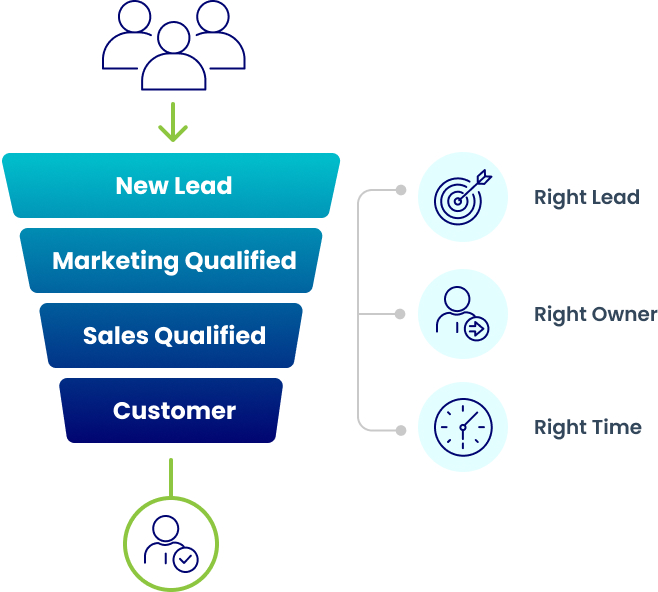
When lifecycle logic weakens, the effects appear fast, as leads sit unrouted, follow-up slows, and teams dispute what a qualified lead means, since each stage encodes who owns a record and when. Those delays carry a measurable cost, because Salesforce research found that the average seller spends only around 40% of their time actually selling, with much of the rest lost to administrative work and manual data entry, and routing that runs automatically returns selling hours that manual sorting would otherwise consume.
Note: For a closer look at how inconsistent lifecycle stages ripple across marketing, sales, and service, this breakdown of the causes of CRM and RevOps misalignment is worth reading.
4. Integrations and Connected Systems
HubSpot seldom operates alone in an enterprise stack, so this capability covers its connections to the surrounding systems: a primary CRM such as Salesforce, an ERP, a data warehouse, billing and payment tools, enrichment providers, and product usage data.
Does HubSpot connect cleanly with your while stack?
Answer: Smart integrations keep data accurate and every team in sync.
The damage from a poor integration is hard to spot because it accumulates without obvious signs, as a sync that drops fields or maps them inconsistently corrupts data on both sides for weeks before anyone notices the numbers no longer agree, with marketing, sales, finance, and customer success all sitting downstream of that failure. A dependable build defines field mappings, sync direction, conflict resolution, and error handling on purpose, then watches them in production.
A case study on resolving data fragmentation for a healthcare transportation provider shows the pattern of joining HubSpot, Salesforce, and enrichment data into one working picture.
5. Workflow Automation and Process Orchestration
Automation turns documented process into work the system runs on its own, from HubSpot workflows and Operations Hub to programmable actions that handle territory assignment, lead rotation, renewals, and data enrichment, and at enterprise scale the harder task becomes orchestration, keeping independent workflows from colliding rather than simply building more of them.
What can HubSpot automation do?
Answer: It automates repeatable work.

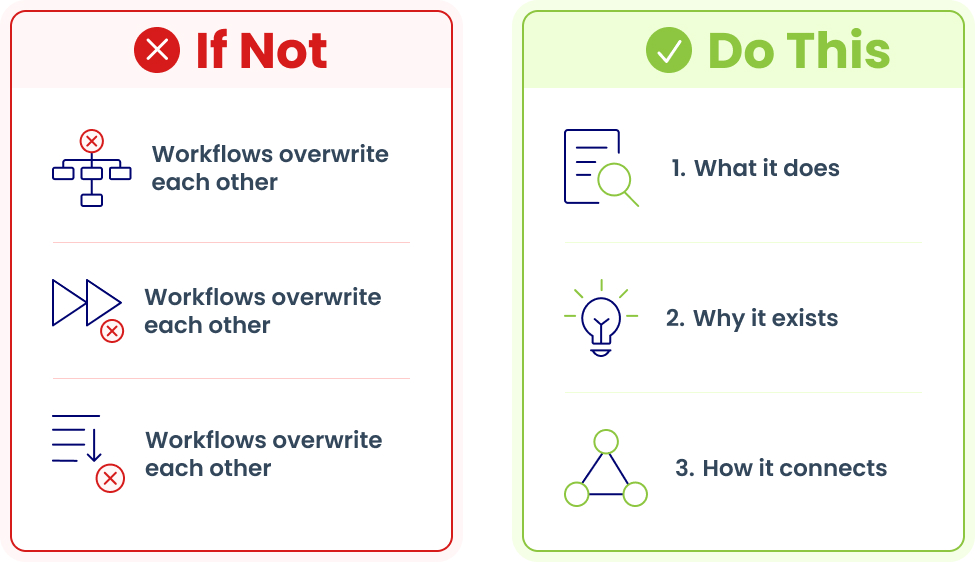
The trouble starts small, as workflows built by different teams begin overwriting each other, firing duplicate actions, or running out of order until the behavior becomes hard to trace. Because automation layered on a flawed process only produces errors faster, durable orchestration maps the process first, then documents each workflow clearly:
- What each workflow does.
- Why it exists.
- How it connects to the others.
How do you stop workflows from colliding?
Answer: Map the process first, the document every workflow.
This overview of HubSpot Operations Hub as an automation and data-cleanup toolkit shows how programmable actions extend the platform without adding hidden complexity.
6. Reporting, Analytics, and Attribution
Executives plan against what the system reports, so analytics carries as much weight as the operations it summarizes, spanning custom reports and dashboards, datasets, attribution models, and the forecasting views leadership relies on.
Analytics that everyone trusts.
One set of numbers. One source of truth.
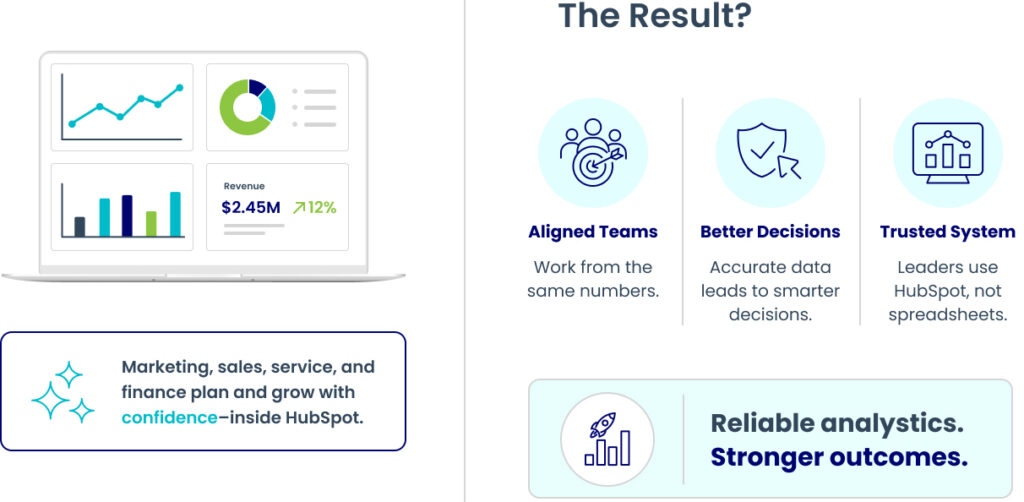
A report inherits the quality of the architecture, data, lifecycle logic, and integrations feeding it, so when those inputs wobble, attribution shifts depending on who runs the report, dashboards contradict one another, and forecasting slides into guesswork that erodes trust in the platform. Reliable analytics gives marketing, sales, service, and finance one set of numbers to plan against, close enough to the underlying records that leadership uses HubSpot directly instead of rebuilding reports in spreadsheets. Dedicated custom HubSpot reporting work focuses on turning raw CRM data into metrics teams can act on.
7. Permissions, Governance, and Change Management
As the user count climbs, controlling how the system is used matters as much as how it was built, which brings in permissions, teams, business-unit partitioning, documentation, and the change-management practices that keep a large portal coherent as many hands touch it.
How do you keep a big HubSpot portal usable?
Answer: Good governance makes the portal easier to use and easier to manage.
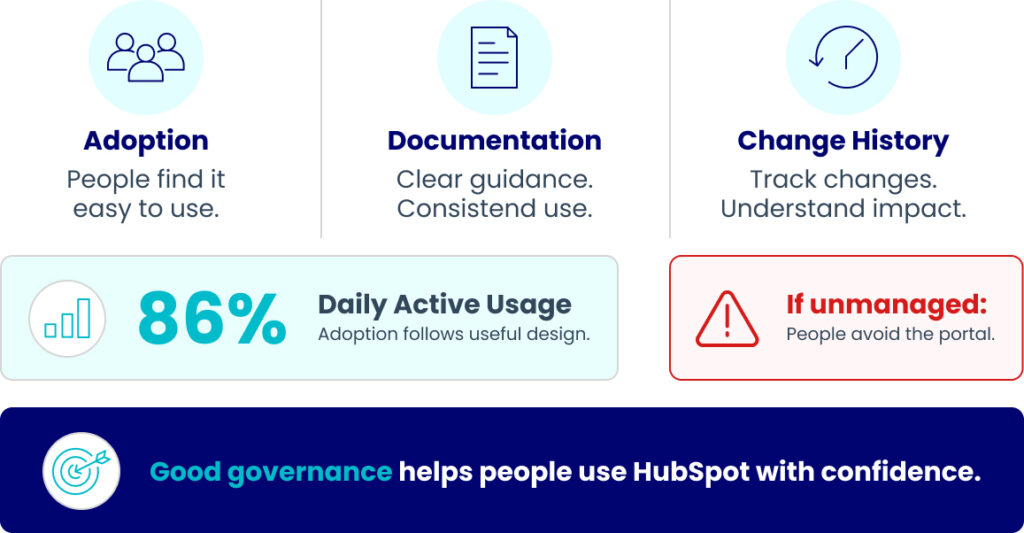
Left unmanaged, permissions sprawl, competing edits undo each other, and undocumented changes leave no one sure why a given workflow or property exists. Adoption reveals whether that governance holds, since a portal people avoid produces nothing however well it is configured, and HubSpot reports 86% daily active usage among its customers, crediting the removal of busywork and value that reaches users directly, which suggests adoption follows good design more than a mandate to log in.
Who should be able to change HubSpot?
Answer: Clear permissions and change rules keep the portal under control.

Sound governance settles who can change what, preserves the reasoning behind key decisions, and reviews changes before they reach production, so a new administrator can read the portal’s structure from documentation instead of reverse-engineering it.
8. AI Enablement and Readiness
AI features in HubSpot draw their usefulness from the data and processes beneath them, so readiness sits among the core capabilities rather than apart as its own initiative. Preparing the data model, lifecycle logic, and workflows gives AI tools and agents the context to act across prospecting, content creation, and service, whereas the same tools pointed at a fragmented portal mostly amplify the noise already there.
What happens when AI lacks a strong foundation?
Answer: It amplifies the noise.
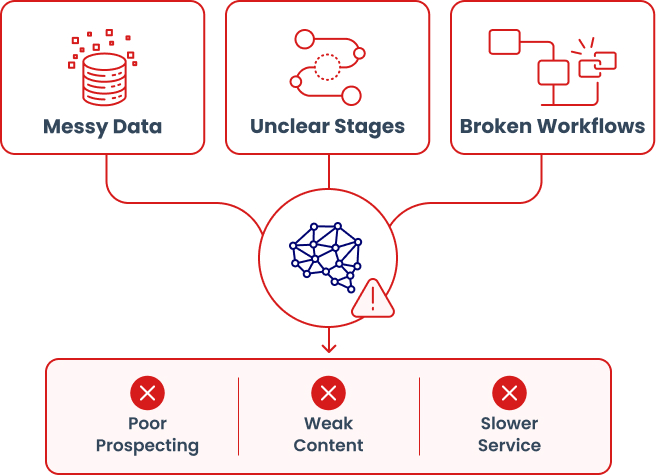
Is your HubSpot ready for AI?
Answer: AI works best when the foundation is clean and connected.

That reliance is the reason a capable partner assesses the groundwork before recommending any deployment, and connects AI actions to the CRM instead of running them off to the side. Marketing, sales, and service each gain from it, though only where clean records, clear lifecycle stages, and sound attribution give the models something dependable to work from. Framing readiness as a groundwork question first and a deployment question second sits at the center of a focused AI-powered solutions practice.
9. Continuous Optimization and Managed Support
After go-live, a revenue system enters the phase where it earns its keep, and the final capability keeps it healthy there through ongoing administration, periodic audits, iterative improvement, and support that catches problems early. Enterprise environments keep changing as teams reorganize, products launch, and integrations evolve, so a portal left alone slowly falls out of step with the business it serves.
What should you focus on first after go-live?
Answer: Build a regular care rhythm that keeps HubSpot healthy.
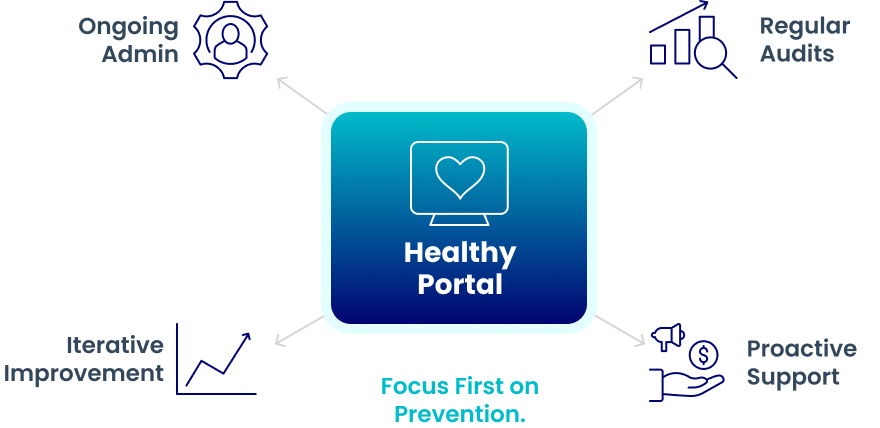
What happens when ongoing care is missing?
Answer: Small issues become big problems.

When that upkeep is missing, small issues pile up, as an unwatched integration degrades, adoption slips, and reporting drifts until the fix becomes a large remediation project. The distinction worth weighing in a partner falls between reactive break-fix help and a proactive rhythm that reviews the portal on a schedule and proposes improvements before a report or forecast finally breaks. HubSpot administration and support services built around that continuing relationship, rather than one-time delivery, keep that debt from taking hold.
Evaluating Implementation Partners, RevOps Agencies, and Consulting Providers
Selecting a partner comes down to separating two things that can look alike from outside: basic HubSpot administration and strategic enterprise RevOps support. An administrator builds a workflow, adds a property, or fixes a broken report on request, while a RevOps partner starts a step earlier, asking why a process exists, how it connects to the wider revenue engine, and what it should measure. Each fits a different need, though enterprise complexity tends to outrun the first, and the table below sets the two side by side.
One signal of that depth is accreditation, since a partner that has earned HubSpot’s CRM implementation accreditation and Elite partner status has usually done so on complex, multi-team work. The questions that reveal the most in a selection process stay specific: how a partner handled a migration of similar scale, how it documents architectural decisions, and how it measures adoption once the system is live.
Dimension | Basic HubSpot Administration | Strategic enterprise RevOps support |
|---|---|---|
Starting point | A configuration request | Process discovery and business goals |
Scope | Individual tasks and fixes | The revenue system as a whole |
Data and integrations | Handled when something breaks | Architected, governed, and monitored |
Documentation | Often minimal or absent | Structured and handed to internal teams |
After go-live | Reactive break-fix | Scheduled review and continuous optimization |
A Framework for Prioritizing Which Capability to Address First
The right order for repairing these capabilities differs from one enterprise to the next, shaped by dependencies, risk, business impact, and how ready the data is, so the most reliable starting point comes from following the most painful symptom back to its source. The table below links common warning signs to the capability gap most likely behind each one.
It reads as a diagnostic aid rather than a fixed sequence, because several symptoms share a root. Conflicting records and distrusted dashboards, for instance, often lead back to the same governance gap, so fixing one underlying capability can clear several surface problems at once.
Visible Symptom | Likely Capability Gap |
|---|---|
Conflicting or duplicate CRM records | Data governance and quality management |
Slow lead follow-up or unrouted leads | Lifecycle and lead management |
Disagreement about lifecycle stages | Lifecycle definitions built on CRM architecture |
Inaccurate forecasting | Reporting, analytics, and attribution |
Disconnected customer data across tools | Integrations and connected systems |
Dashboards no one trusts | Data governance feeding reporting |
Workflow conflicts or duplicate automated actions | Workflow automation and orchestration |
Poor user adoption | Permissions, change management, and training |
Unclear AI readiness | Architecture and data-quality foundation |
Foundational gaps in architecture and data quality usually deserve attention before optimization work such as attribution or AI, even when the visible symptom sits elsewhere.
Note: When the highest-impact gap is genuinely unclear, a HubSpot audit and health check is usually the fastest way to surface the true starting point before committing to a sequence.
Conclusion
These nine capabilities earn their value through how they connect, since architecture and data quality set the ceiling for what lifecycle logic, integrations, and automation can reliably do, and those in turn decide whether reporting, AI, and continuous optimization produce results leadership can trust. Handling any one in isolation tends to relocate a problem rather than resolve it, which is why enterprise HubSpot RevOps services treat the whole chain as a single operating system.
For most enterprises the practical next step is an honest read on where the system is solid and where it leaks value, which rarely means a full rebuild, since naming the highest-impact gap along with what it depends on turns a long list of possible work into a clear first move.
As an enterprise HubSpot and RevOps partner, Vonazon helps operations leaders find these gaps and sequence the next stage of revenue operations optimization, from architecture and data quality through integrations, automation, and analytics. Teams ready to review where their system is strong and where it leaks value can schedule a consultation with Vonazon to decide where to begin.
Frequently Asked Questions
What are HubSpot RevOps services?
They align marketing, sales, and customer service inside HubSpot by designing the CRM architecture, data governance, processes, integrations, automation, and reporting that connect those teams around shared revenue goals, then maintaining that design as the business evolves.
Can HubSpot support enterprise revenue operations?
Yes. Custom objects, business-unit partitioning, permissions, integrations, datasets, and programmable automation let HubSpot serve as the operating system for a large multi-team revenue engine. How well the platform is architected and governed usually matters more than the edition alone.
What should enterprises look for in HubSpot implementation partners?
Process discovery before configuration, depth in CRM architecture and integrations, disciplined data governance, thorough documentation, change management and training, and support that continues after go-live. Specifics on comparable projects tell more than general claims.
What is the difference between a HubSpot agency and a RevOps agency?
A general HubSpot agency often centers on marketing execution and platform setup. A RevOps agency works across the full revenue motion, aligning systems, data, and processes for marketing, sales, and customer success. Some accredited partners cover both.
When should an enterprise hire HubSpot experts?
Common triggers include a new rollout, a migration from another CRM, a merger that combines systems, forecasts leadership no longer trusts, or automation that has grown too tangled to manage internally.
What does enterprise RevOps consulting include?
Typically a review of current architecture and processes, recommendations for data governance and integrations, a prioritized roadmap, hands-on implementation or oversight, and measurement of adoption and outcomes after launch.
How should an enterprise prioritize HubSpot optimization?
Begin with the most costly symptom and trace it to the capability gap beneath it, then weigh dependencies, risk, and data readiness. Foundational gaps generally come before optimization work such as attribution or AI.
How long does enterprise HubSpot implementation take?
Timelines vary widely with the number of teams, the complexity of integrations, and the state of existing data, so a fixed universal estimate misleads. A scoping assessment is the reliable way to set an accurate timeline for a specific environment.



Identify the gaps across your data, integrations, automation, and reporting, then prioritize what needs attention first.