

7 CRM Onboarding Features Mid-Market Teams Need
Why do so many mid-market CRM rollouts underdeliver even when the software works?
55%
Research from Johnny Grow puts the CRM failure rate at 55%, measured as deployments that miss their planned objectives.
The platform is rarely the whole story; how the rollout is scoped, migrated, and adopted tends to matter more.
Think of CRM onboarding services as total setup and adoption support, not just quick software training. So, what works best for a mid-sized company? Results rarely depend on a big brand name. Instead, seven practical factors decide if your team uses the tool or leaves it behind. Each section below pairs a key question to ask with a warning sign to spot before you hire anyone.
Table of Contents
Feature 1: Discovery and CRM Architecture Planning
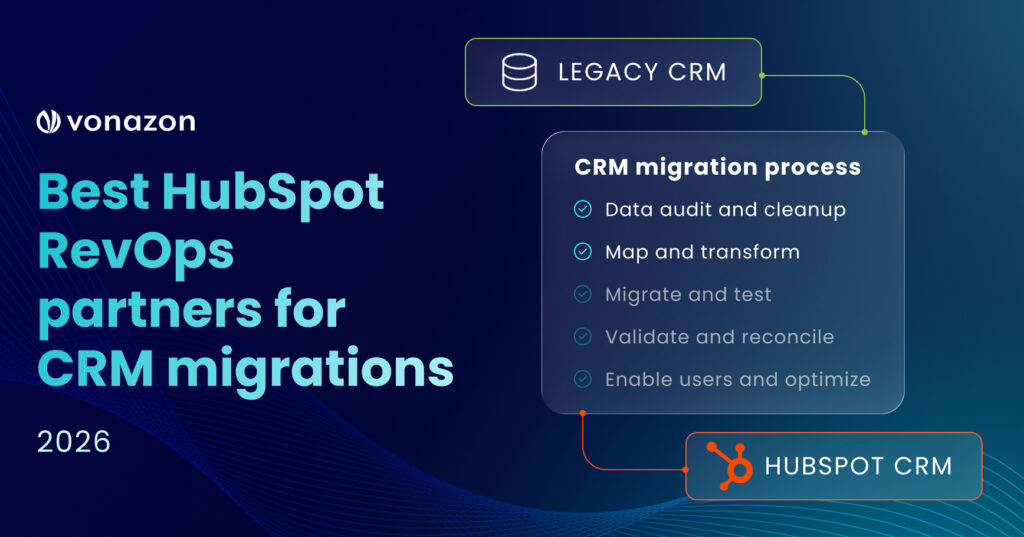
Feature 2: Data Migration, Cleanup, and Field Mapping
Feature 3: Lifecycle stages, pipelines, scoring, and routing
Feature 4: Integrations and Source-of-Truth Planning
Feature 5: Workflow and Automation Setup
Feature 6: Training, Documentation, and Adoption Support
Feature 7: Reporting, Governance, QA, and Post-Launch Optimization
Feature 1:
Discovery and CRM Architecture Planning
Why it matters. Configuration built before objectives are defined tends to get rebuilt later. For a mid-market team, that rework lands in month three, once real deals and reports expose the gaps.
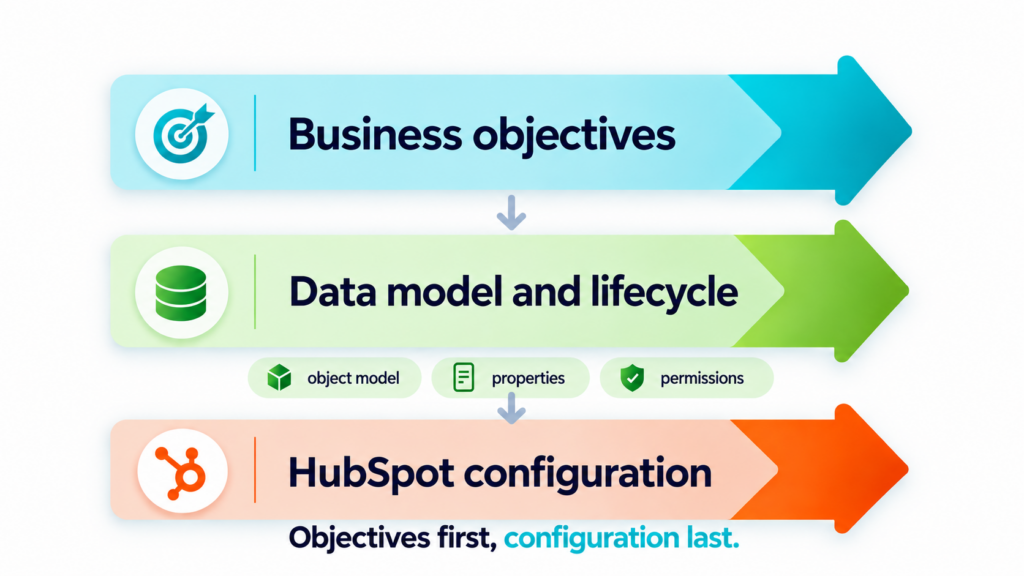
What onboarding should cover. Strong discovery produces an artifact, not a kickoff chat. It maps business objectives to a data model: which objects, which properties, which permissions, and which hubs go live first. A structured HubSpot implementation approach treats that architecture as the foundation the rest of the project stands on.
The buyer question. Can the provider show a discovery-to-architecture document from a comparable mid-market build?
The warning sign. A provider that starts configuring in week one, with no documented outcomes, may be working from assumptions rather than an agreed architecture.
Feature 2:
Data Migration, Cleanup, and Field Mapping
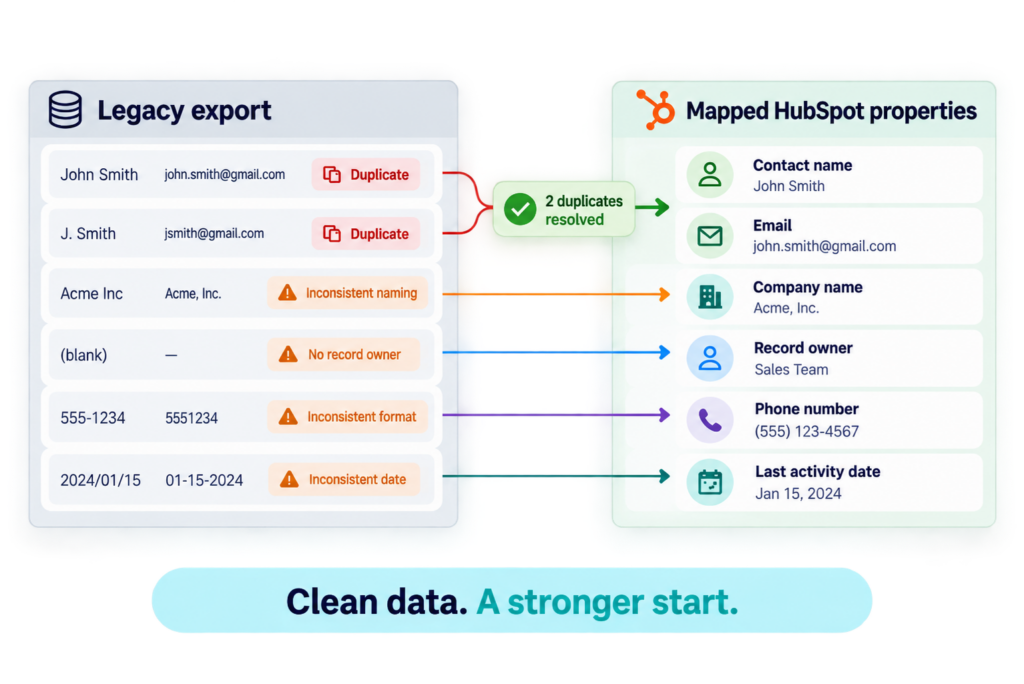
Why it matters. Migrating legacy data without cleaning it reproduces every old problem in a new portal, at higher cost. Bad records then undermine routing, scoring, and reporting from day one.
How serious is the data problem? In Validity’s State of CRM Data Management in 2025, a survey of 602 CRM users, 76% said less than half of their CRM data is accurate and complete, and 37% reported losing revenue as a direct consequence of poor data quality.
What onboarding should cover. Deduplication and governance rules defined before import, a documented field-mapping sheet, and a cleansing stage that a client stakeholder signs off on.
The buyer question. What is the migration and deduplication methodology, and who approves the field mapping?
The warning sign. A lift-and-shift import with no cleansing stage.
Feature 3:
Lifecycle Stages, Pipelines, Scoring, and Routing
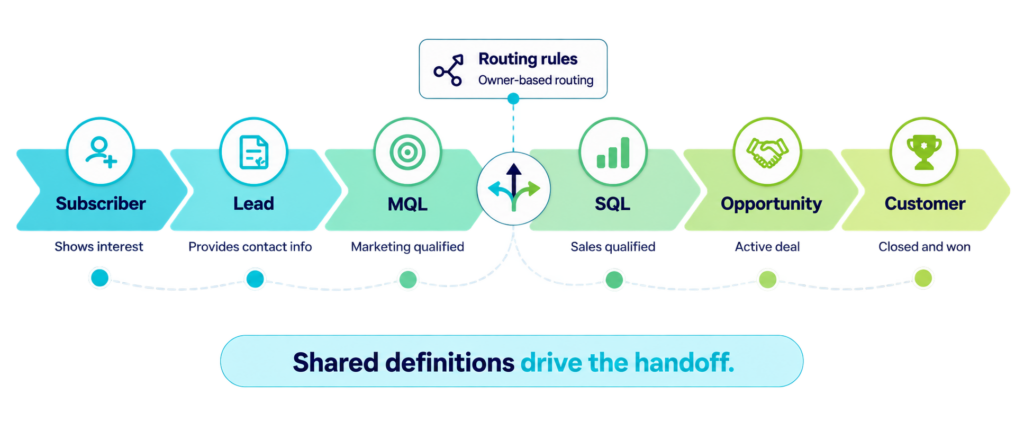
Why it matters. Pipelines and routing only work if teams agree on what the stages mean. When definitions drift, leads stall in handoffs and forecasts stop being believable.
This is where sales and marketing alignment becomes operational, not theoretical. Forrester’s research ties cross-functional alignment to revenue growth and faster time to market, particularly when teams share a common goal. Onboarding is the moment to encode that shared goal into the system.
What onboarding should cover. Agreed lifecycle stages, a shared definition of an MQL and an SQL, pipeline stages that match how deals actually move, and routing rules tied to clear ownership.
A common mid-market symptom illustrates the risk. As Vonazon describes the pattern, marketing may report 400 MQLs a quarter while sales recognizes fewer than 100 as workable, so pipeline meetings turn into debates about whose number is real. Agreeing the definition before configuration prevents that argument.
The buyer question. How does the provider facilitate shared lead definitions across teams before building anything?
The warning sign. Pipelines copied from a template, with no definition workshop.
Must Read: Before any pipeline is built, have sales and marketing write the MQL and SQL definitions together. If they cannot agree on one, resolve that first, because configuration will not.
Feature 4:
Integrations and Source-of-Truth Planning
Why it matters. Mid-market stacks rarely live in one tool. When systems sync without a plan, conflicting records appear and no one knows which value is correct.
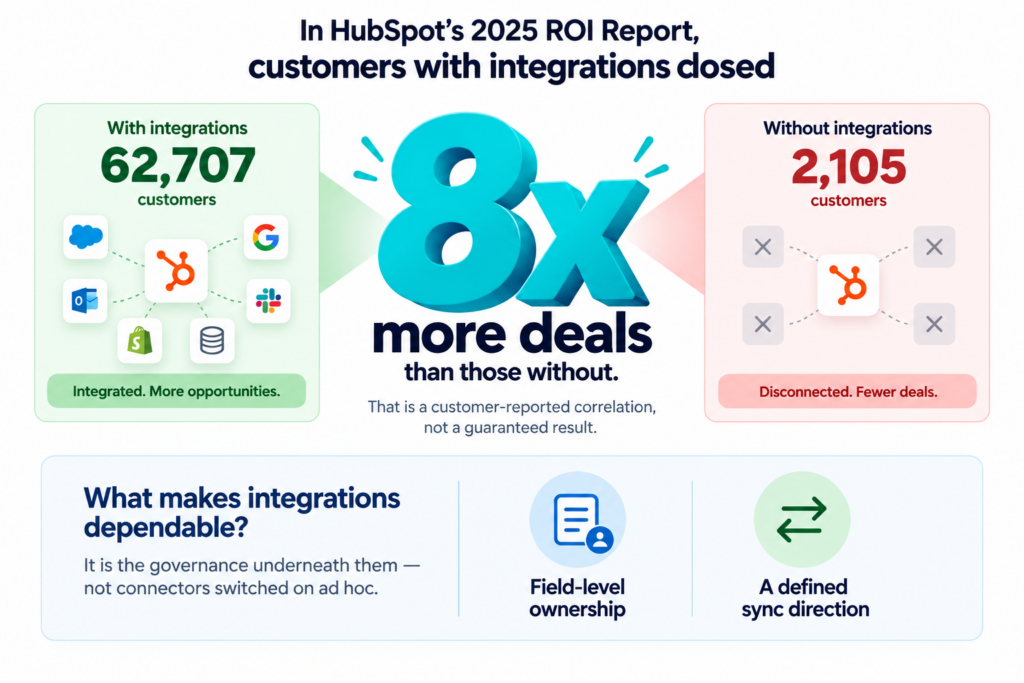
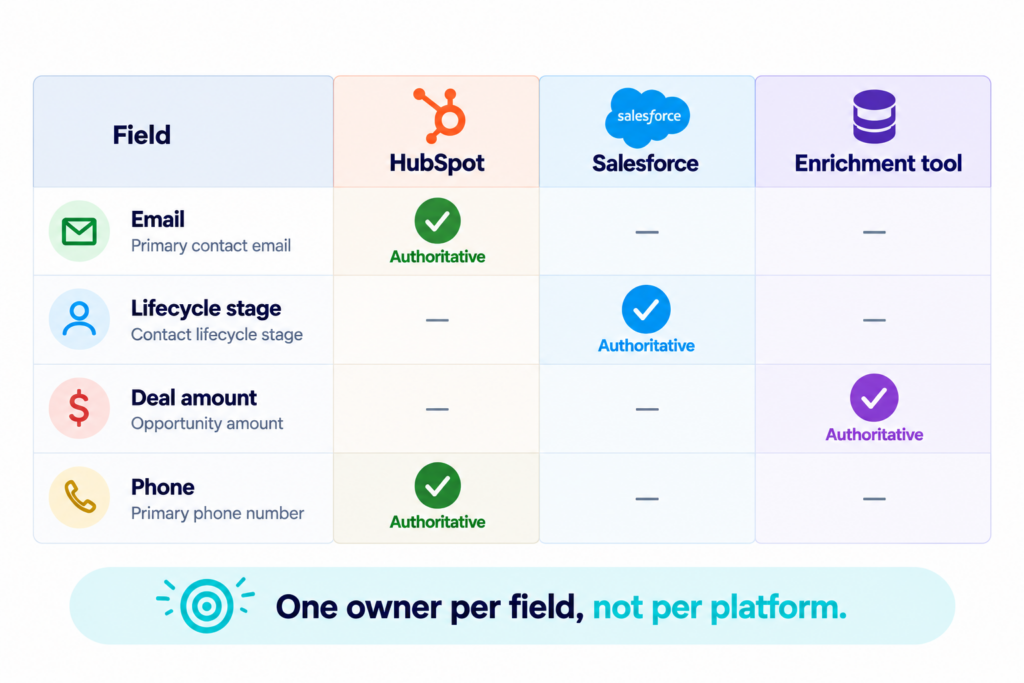
A common framing asks whether HubSpot or Salesforce should be the single source of truth. A more useful question is narrower: which system owns each field? That points toward field-level governance, where ownership is assigned per field to the team that does the work, and sync direction is decided before any connector is switched on.
In HubSpot’s 2025 ROI Report, customers with integrations closed 8x more deals than those without, from 62,707 integrated customers versus 2,105. That is a customer-reported correlation, not a guaranteed result. What makes integrations dependable is the governance underneath them: field-level ownership and a defined sync direction rather than connectors switched on ad hoc.
This is also the clearest line between software setup and real onboarding. Connecting two systems is setup. Deciding which system wins a conflict, and training people on how the sync behaves, is onboarding.
What onboarding should cover. A field-level ownership map for each connected system, defined sync direction, and conflict rules.
Fragmented data is where many mid-market rollouts quietly break. In one documented engagement, the company MTM worked with Vonazon to unify scattered systems into HubSpot, connecting Salesforce and ZoomInfo, with onboarding sessions covering how data syncs, how lead intelligence transfers, and how lead scores are calculated across the connected systems. The integration and the training were handled as one job.
The buyer question. Can the provider produce a field-level ownership map for every integrated system?
The warning sign. Connectors turned on with no agreement on which system wins a conflict.
Feature 5:
Workflow and Automation Setup
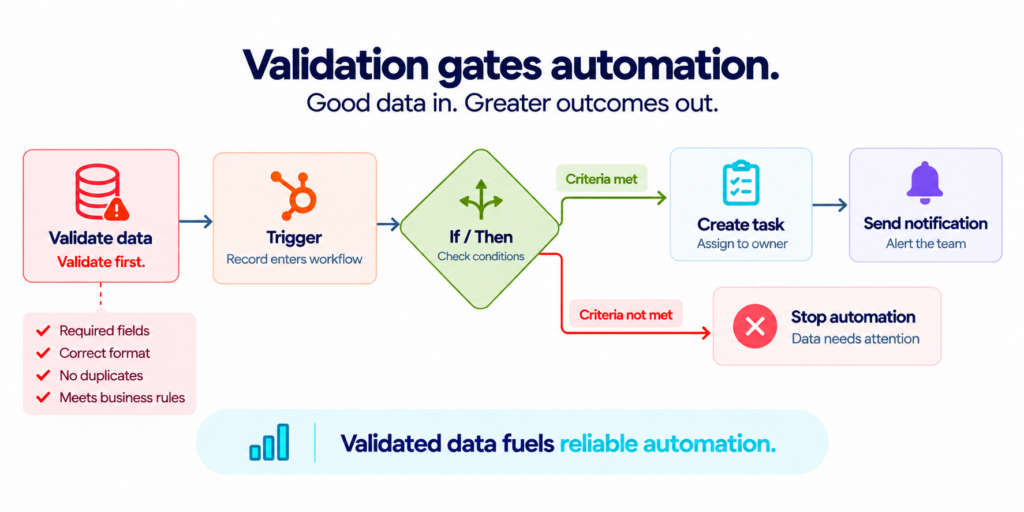
Why it matters. Automation multiplies whatever it is given. Applied to a broken process or bad data, it scales the error instead of the outcome.
What onboarding should cover. Documented, validated processes first, then automation for handoffs, tasks, and follow-ups, with guardrails that stop workflows from acting on unreliable records.
Automation is another setup-versus-onboarding divide. Building a workflow is setup. Confirming the process it automates is real, and that people trust the result, is onboarding.
The buyer question. Which processes will be documented and validated before any workflow is built?
The warning sign. Heavy automation delivered before data governance exists.
Feature 6:
Training, Documentation, and Adoption Support
Why it matters. A configured CRM that no one uses is a cost, not an asset. Adoption is where the failure statistics are usually decided.
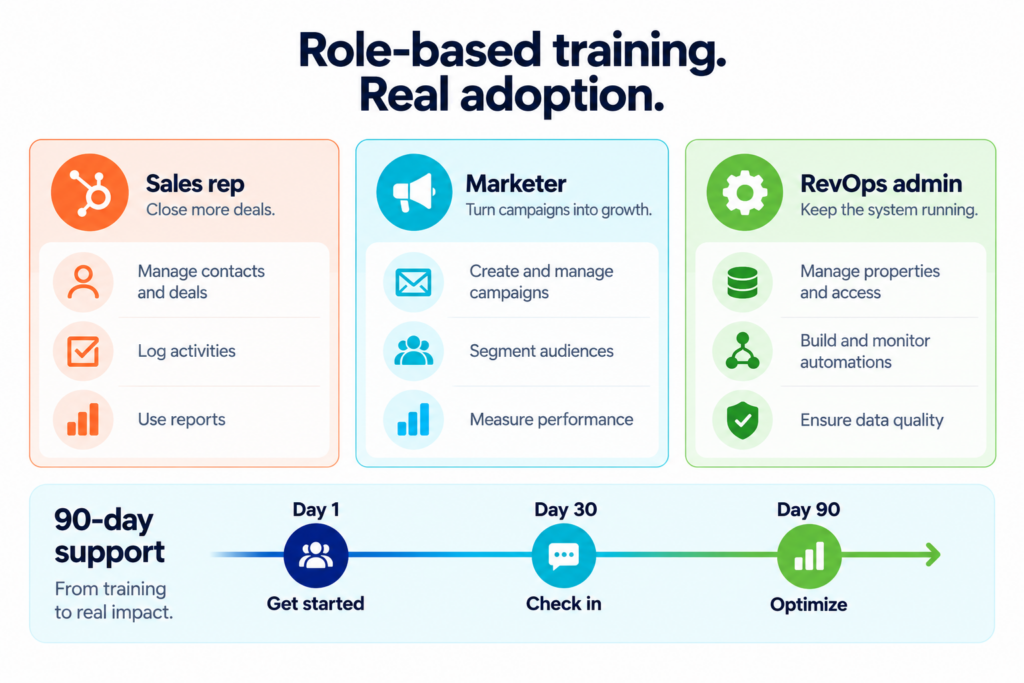
A configured tool earns nothing until people use it in their daily work. Adoption depends on training built around real roles, documentation people can return to, and leadership modeling use in the CRM itself, not on a single launch-day demo.
What onboarding should cover. Role-specific training mapped to each team’s daily work, living documentation, leadership running reviews inside the CRM, and a support channel through the first 90 days, so adoption is planned into a mid-market rollout rather than left to launch day.
The buyer question. Is training mapped to each role’s daily workflow, and what does post-launch support actually cover?
The warning sign. One generic demo, followed by “figure it out.”
Feature 7:
Reporting, Governance, QA, and Post-Launch Optimization
Why it matters. Reporting is where leadership either starts trusting the CRM or quietly returns to spreadsheets. Without governance and QA, data quality decays and reports lose credibility.
In HubSpot’s 2025 ROI Report, customers using Marketing, Sales, and Service Hub reporting showed a 5x higher deal close rate than those without it, from 11,440 customers with reporting activated versus 369. The sample sizes are uneven and customer-reported, so the figure describes a correlation rather than a guaranteed lift.
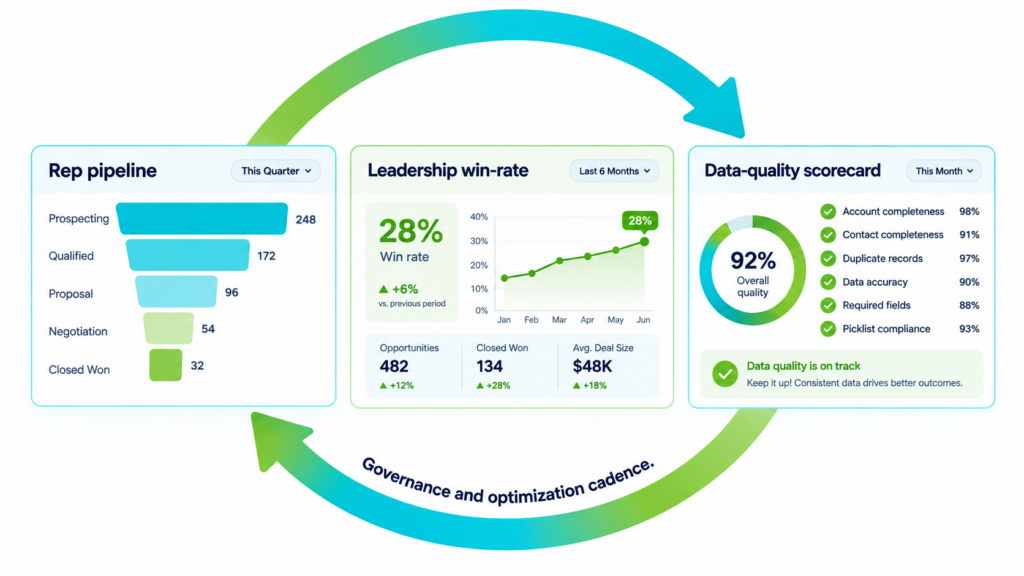
What onboarding should cover. Dashboards leadership will actually run reviews from, a named owner for data governance, a QA log before go-live, and a defined optimization cadence after launch.
This is the final setup-versus-onboarding line. A dashboard that exists is setup. A dashboard leadership reviews weekly, backed by a governance owner, is onboarding. A useful question for any provider, including a RevOps implementation partner, is who owns data governance after launch and how that ownership is documented.
The buyer question. What is the governance model and the optimization cadence after go-live?
The warning sign. A provider that disappears at launch, with no QA log and no governance owner.
Must Read: Confirm a named data-governance owner and a dashboard review cadence before go-live, not after. A provider that cannot name either is not finishing the job.
Mid-Market CRM Onboarding Evaluation Checklist
Feature | What Strong Onboarding Includes | Warning Sign |
|---|---|---|
1. Discovery and architecture | Objectives mapped to data model, properties, permissions, and phased hub rollout | Configuration starts in week one with no documented outcomes |
2. Data migration and cleanup | Deduplication and governance rules, signed-off field mapping, a cleansing stage | Lift-and-shift import with no cleaning |
3. Lifecycle, pipelines, scoring, routing | Shared MQL and SQL definitions agreed before build, owner-based routing | Template pipelines, no definition workshop |
4. Integrations and source of truth | Field-level ownership map, defined sync direction and conflict rules | Connectors switched on with no conflict rules |
5. Workflow and automation | Validated processes first, guardrails against acting on bad data | Automation before governance exists |
6. Training and adoption | Role-specific training, documentation, 90-day support, leadership using the CRM | One generic demo, then no support |
7. Reporting, governance, QA | Dashboards for reviews, named data owner, QA log, optimization cadence | Provider disappears at launch |
Conclusion
A CRM can be configured correctly and still struggle. It can migrate on schedule and still hold data nobody trusts. It can launch on time and still see reports ignored, leads misrouted, and reps back in spreadsheets.
That gap is the whole point. Software setup is a technical milestone. Onboarding is an operational outcome. The difference shows up in adoption, data quality, reporting confidence, and how maintainable the system stays a year later.
So the sharper way to evaluate any provider is to ask whether the onboarding connects the full chain: strategy, data, process, automation, people, reporting, and governance. A provider strong on three or four links, and silent on the rest, leaves the weakest link to decide the result.
Mid-market teams weighing that chain can talk through their rollout with an Elite HubSpot Partner to pressure-test where the gaps are before signing.
Frequently Asked Questions
What are the top CRM onboarding services for mid-market companies?
The most useful way to compare providers is by capability, not by a service menu. Seven features form a practical evaluation framework: discovery and architecture, data migration and cleanup, lifecycle and pipeline design, integration and source-of-truth planning, workflow automation, training and adoption, and reporting with governance. Scoring each provider against those seven, and asking for evidence on each, gives a clearer picture than a feature list alone.
What should CRM onboarding include?
It should include far more than platform setup. Effective onboarding covers objective-led architecture, cleaned and mapped data, agreed lifecycle and routing definitions, planned integrations, validated automation, role-specific training, and a governance model for reporting after launch.
How long does CRM onboarding take?
Timing depends on scope, so a single universal timeline is misleading. The main variables are data quality, the number of integrations, and how many hubs go live at once. A lean rollout can move quickly, while a multi-system mid-market build with heavy migration and integrations takes longer. A credible provider scopes timing to those factors rather than quoting a fixed number.
What is the difference between CRM onboarding and CRM implementation?
Providers use these terms inconsistently. Some call product orientation and user training “onboarding,” and reserve “implementation” for architecture, migration, and integrations. This article uses CRM onboarding services in the broader sense defined at the top: the implementation and adoption support around a rollout. For a mid-market buyer the label matters less than the scope, so the test is whether the work covers all seven features here, whatever a provider calls it.
How can CRM onboarding improve CRM adoption?
Adoption improves when onboarding is designed for it. Role-specific training, clean data, definitions teams agree on, and leadership running reviews inside the CRM all reduce the reasons people revert to old tools. HubSpot’s own 2025 customer data associates high adoption and partner-supported onboarding with stronger results, though those figures are self-reported.
When should a company use CRM consulting?
Consulting is often worth considering when processes are unclear, data is messy, several systems must integrate, or sales and marketing cannot agree on definitions. Those conditions may justify additional CRM consulting because the work extends beyond standard platform configuration.
What should mid-market teams look for in HubSpot onboarding support?
Look for objective-led discovery, a documented migration and governance method, field-level integration planning, role-based training, and a defined post-launch optimization cadence. Partner credentials, such as Elite tier and CRM implementation accreditation, can indicate platform experience, but the scope of work, the method, and relevant proof from comparable builds matter more.




Evaluate onboarding across all seven features, from clean data and clear definitions to reporting and governance, so the CRM gets adopted, not abandoned.