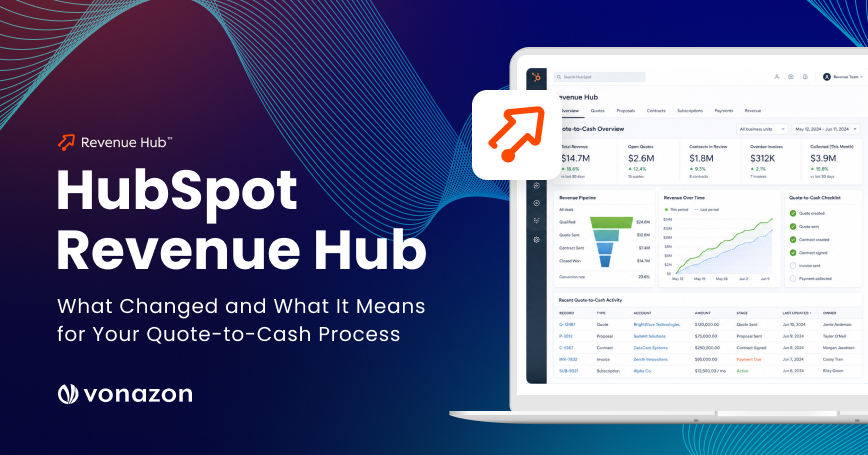
HubSpot Revenue Hub: What Changed and What It Means for Your Quote-to-Cash Process
A Vonazon RevOps guide to the 2026 shift from Commerce Hub to Revenue Hub
Key Takeaways
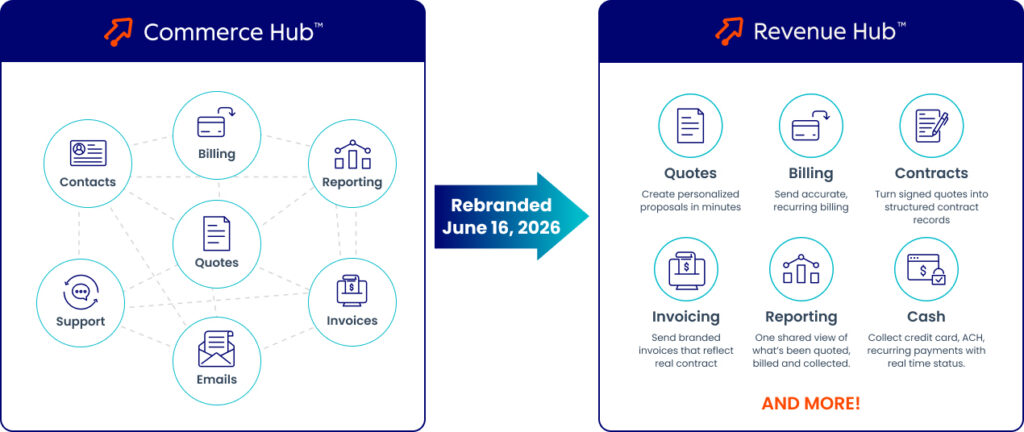
Commerce Hub is now Revenue Hub
The June 16, 2026 rebrand signals an operating-model change, not just a new name: quote-to-cash now runs inside HubSpot’s Smart CRM.
Quote-to-cash is one connected process
A deal moves through quoting, approval, acceptance, contracting, billing, payment, and renewal, and every stage draws on the same governed set of data.
The contract is the new source of truth.
After acceptance, the contract holds committed revenue, billing schedules, changes, and renewals, so you no longer rely on a spreadsheet.
AI handles volume; people handle judgment
Breeze drafts quotes and prioritizes overdue invoices; humans own disputes, strategy, and exceptions.
Manual quote-to-cash leaks revenue
EY estimates organizations lose 1–5% of EBITDA to data and hand-off issues across the process. Connecting it protects margin.
Roll out in stages, measure in 30/60/90
Inventory, design, clean data, configure, connect finance, test, and launch. Then track speed, cash, and revenue over the first three months.
Why Quote-to-Cash Just Changed Inside HubSpot
Still moving a signed quote into a contract spreadsheet, a billing queue, and a finance system by hand? Still reconciling renewal dates, invoice totals, payment statuses, and customer histories before every revenue meeting?
HubSpot rebranded Commerce Hub as Revenue Hub in June 2026 and describes it as an AI-powered CPQ, billing, and payments platform built into the Smart CRM. The change matters because it collapses the gap between closing a deal and collecting the cash. HubSpot now reports an average quote-to-signature time of about 10 minutes and 20+ admin hours saved per month through automation on the platform.
Use this guide to map the 2026 Revenue Hub changes to the work your revenue team does every day: configure, price, quote, approve, accept, contract, bill, collect, renew, expand, and report.
Why It Pays Off
According to EY research on revenue leakage, organizations lose an estimated 1–5% of EBITDA to the manual steps and system hand-offs that sit between a signed quote and collected cash. That pattern is echoed in DigitalRoute’s revenue leakage research. Connecting the process protects margin; it is not just a time-saver.
Look at the shift by area, not by feature name:
Area | Earlier Pattern | Revenue Hub Direction | What to Do |
|---|---|---|---|
Product identity | Commerce Hub | Revenue Hub (June 16, 2026) | Update enablement, navigation, and internal docs |
Quoting | Quote creation separate from revenue ops | AI quoting, rules, approvals, acceptance, payment | Standardize pricing and approvals before sending |
Post-close record | Manual move to contract or billing | Accepted quote becomes a contract | Treat the contract as the long-term record |
Billing | Manual invoice and schedule upkeep | Schedule from contract terms and line items | Govern bill dates, recurrence, and timing |
Checkout | Payment attached to the quote | Invoice-centered checkout after acceptance | Prepare buyers for Pay now / Schedule payment |
Collections | Flat overdue list, manual follow-up | Breeze prioritization + Customer Agent | Point people at exceptions and relationships |
Revenue visibility | Separate sales and finance numbers | Connected deals, contracts, invoices, payments | Agree on metric definitions before dashboards |
The Core Reframe
Treat quote-to-cash as one connected operating process, not a chain of disconnected records.
It is tempting to treat a product rename as a branding exercise: update the navigation labels, swap the name in your training decks, and move on. Revenue Hub asks for more than that. The more useful question is what your team actually does differently now that quoting, contracts, billing, payments, and renewals live in one connected system instead of several disconnected ones.
Three things changed in substance, not just in name:
- A broader remit. Commerce Hub centered on payments and standalone quoting. Revenue Hub spans the entire revenue cycle as one workflow, covering quote creation, CPQ, contracts, billing, payments, renewals, expansion, and reporting.
- One connected customer record. Customer, deal, product, contract, invoice, payment, and renewal information now sit together in the CRM, so no one has to stitch the story together across separate tools before a revenue conversation.
- AI built into the workflow. HubSpot’s Breeze assistant can draft quotes, answer customer billing questions, prioritize overdue invoices, and handle routine follow-up, always within the approval limits you set.
The practical takeaway is a shift in mindset. A signed quote is no longer the finish line. Acceptance becomes the moment a deal hands off into a governed revenue process that carries it through billing, collection, and renewal, with a clear record of what was agreed at every step.
For the full story, read HubSpot’s Revenue Hub launch announcement and its release notes for the feature-by-feature timeline.
What the Connected Quote-to-Cash Flow Actually Looks Like
In the connected model, one deal moves through a single continuous path. Because each step passes its data to the next, nobody re-keys information or reconciles it later.
Here is the journey end to end, and what each step is really doing:
- 1. Build the deal and its line items. Start from the deal record and add the products or services being sold. This is the raw material for everything downstream.
- 2. Create the quote, then run it through rules and approvals. Pricing guardrails and approval routing catch discount and configuration problems before the buyer ever sees the document.
- 3. The buyer accepts. Acceptance is the pivotal handoff, the point where the deal stops being a proposal and becomes a commitment.
- 4. A contract is created and a billing schedule is set. The contract becomes the lasting record of what was agreed and when it should bill, replacing the spreadsheet you used to maintain by hand.
- 5. Invoices generate, and payment is collected or scheduled. The buyer pays now or schedules a payment, and recurring items invoice automatically on their own dates.
- 6. Renewals and changes flow back into the same contract. Upsells, downgrades, and renewals update the existing contract instead of starting a new record, so history stays in one place.
- 7. Everything reports from one dataset. Because deals, contracts, invoices, and payments are linked, revenue reporting becomes a byproduct of the process rather than a monthly reconciliation project.
You do not have to adopt all of this at once. A staged rollout might connect quoting first, add online payments next, and layer in contracts and billing later. What matters is choosing that path deliberately, whether that means quoting only, quoting plus payment, or the fully connected process, rather than leaving gaps where work quietly falls back to manual hand-offs.
The Connected Quote-to-Cash Flow

What Changed for Quotes, CPQ, Approvals, and Acceptance
Start with the buyer’s decision: which products, services, quantities, terms, billing dates, payment methods, acceptance methods, and approval conditions need explicit agreement?
Quote Creation
Build from deal context. Draft content, line items, and buyer-facing language with Breeze prompts. Control presentation in the quote editor. Reuse products from the product library. Price by region, partner, segment, or tier with price books. Support flat-rate, tiered, stair-step, and recurring models. Clean, reliable data first; AI execution second.
Quote Rules and Approvals
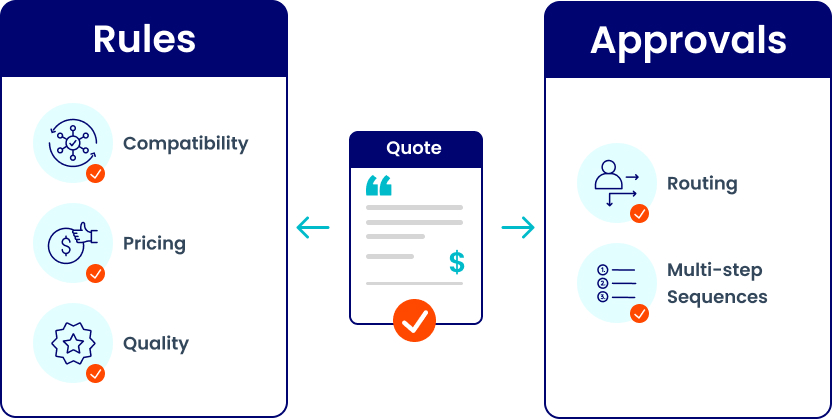
Set compatibility and incompatibility rules for product combinations. Set pricing rules for price, margin, or discount thresholds. Set quantity rules for minimums, maximums, and volume conditions. Route approvals by amount, discount, term length, or product. Pick the sequence: one approver, any approver, all approvers, or multi-step. Fix errors inline at build time, not after buyer delivery.
Use rules for guardrails; use approvals for judgment.
Pricing boundaries prevent avoidable errors, while unusual terms, strategic discounts, and legal exceptions still need human oversight.
Buyer Acceptance and Primary Quote Behavior
Offer click-to-accept, e-signature, or print-and-sign. Route signature delegation to the correct internal signer without rebuilding the quote. Add password protection for sensitive pricing. Remember that quote status and signing status can move separately. One primary quote controls the deal amount and line items. An accepted quote becomes primary by default, and a published quote cannot replace an accepted one.
For the full object model, see HubSpot: understand how quotes work and HubSpot CPQ documentation.
Template Updates from Q2 2026
The Standard Quote Template Migrator reached general availability on June 30. Use section-level AI writing guidelines for on-brand, legal, and customer-context guidance. Add custom-coded (CMS React) quote modules for conditional terms and branded elements. Lock and hide modules to protect legal and required sections from rep-level edits. Set a default automated reminder schedule, with a per-quote toggle for exceptions.
CPQ Guardrails: Rules vs. Approvals
Why Contracts Matter After Quote Acceptance
Use the contract as the long-term record for committed revenue, effective dates, renewal timing, current and historical line items, billing information, associated invoices and payments, change and renewal quotes, and amendment history.
Source-of-Truth Rule:
Recurring line items can create a subscription record for reporting, but billing changes belong on the contract. Subscription edits do not update the contract or billing schedule.
For the end-to-end journey, read HubSpot: manage end-to-end revenue. For data governance and integration architecture, connect this work with Vonazon’s Data Hub services.
Sort contract work by function so ownership stays clear: sales owns post-sale context and change or renewal quotes; customer success owns onboarding context and renewal prep; billing owns invoices, payment status, and open balances; finance owns committed revenue and reconciliation; marketing owns attribution and expansion signals.
What Changes with Connected CPQ, Billing, and Payments
Start with enrollment: are you in the Connected CPQ, Billing, and Payments beta, or using a different quote and payment path? For the connected beta:
- Buyer accepts the quote; contract creation can happen automatically when the setting is enabled.
- The first invoice can generate and deliver right after acceptance, even when the due date sits in the future.
- Invoice generation follows the billing schedule from quote line items; recurring items invoice at each interval.
- Default invoice email timing runs 10 days before the invoice date, subject to billing settings.
- A stored payment method enables automatic collection for future invoices once the buyer gives permission at checkout.
Read the complete Connected CPQ, Billing, and Payments process before changing production workflows.
Watch These Limitations
Invoices below $0.50 mark as paid immediately, and processing below $0.50 is unavailable. There is no direct pause-and-resume on a contract; to pause, remove recurring line items through a change quote, then re-add them through a later one. Buyers cannot view the contract object itself, so buyer-facing documents stay as quotes, invoices, and receipts.
First Invoice Timing | Online Payments | Buyer Action | Team Action |
|---|---|---|---|
Due at acceptance | On | Pay now or copy invoice link; receipt after checkout | Confirm billing contact, payment storage, recurring schedule |
Due at acceptance | Off | View or copy invoice link | Record payment manually; monitor future invoices |
Due later | On | Schedule payment; $0 checkout for future-dated items | Confirm first bill date and stored authorization |
Due later | Off | View or copy invoice link | Record payment manually; keep exception follow-up |
Buyer-Facing Test:
Can a customer tell the difference between accepting a quote, viewing an invoice, paying now, and scheduling a payment without contacting sales?
Payments, Collections, and Accounts Receivable
Collection Choices
Use HubSpot Payments for card, ACH, and other supported methods, subject to location and eligibility. Use Stripe where a Stripe setup is required. Record offline payments, such as checks and bank transfers, so the picture stays complete. Use payment links for one-time or recurring collection outside a full quote flow.
Collections and Exceptions
Let Breeze rank overdue follow-up by risk, age, and customer value. Let Customer Agent look up invoices and deliver payment links inside supported conversations. Track the upcoming Revenue Agent for account-aware overdue follow-up under human review controls. Escalate disputes, strategic accounts, complex failures, and sensitive situations to a person. Log every AI recommendation, draft, action, approval, and escalation.
Operating Model
AI for prioritization and repeatable work; people for context, judgment, negotiation, empathy, and exceptions.
A tighter collections loop protects cash. A healthy days-sales-outstanding (DSO) benchmark sits around 30-45 days for SaaS and software businesses; connected billing and automated reminders help you trend toward the low end. See 2026 DSO benchmarks by industry.
Buyer Self-Service and Credit Memos
Give buyers a Billing Portal for invoice viewing, payment, payment-method updates, PDF downloads, and subscription management, subject to rollout. Create a credit memo from an invoice to adjust the original balance, then apply available credit to a future invoice. Sync credit memos bi-directionally with QuickBooks Online. Ask the control question every time: does this event belong in a change quote, a credit memo, or an invoice correction?
Mid-Contract Changes and Renewals
A change quote is the tool for anything that alters a live contract: upsells and upgrades, downgrades, adding or removing a feature, changing quantities, adjusting price, setting a new effective date, or prorating the remainder of a term.
The path is straightforward. Open the existing contract, create a change quote, and adjust the products, quantities, pricing, and effective date. Send it through the same rules and approvals as any other quote. Once the buyer accepts, the contract updates and billing adjusts automatically for the rest of the term.
Renewals work much the same way. As a contract nears its renewal date, HubSpot can raise a task or alert, carry the current line items into a renewal quote, and let you revise scope or price before the buyer accepts. The renewed terms become the next contract, and the history from one contract to the next stays intact, so you can always see how an account grew or changed over time.
What Revenue Hub Changes for Reporting
Replace record-count reporting with lifecycle reporting. Track quote-to-signature time, quote acceptance rate, approval cycle time, quote-to-contract conversion, quote-to-invoice latency, invoice-to-payment time, days sales outstanding, payment failure rate, open receivables by risk and age, booked / expanded / churned / net-new MRR, ARR, total contract value, renewal rate, net revenue retention, and manual reconciliation hours.
Operating Model
Quote-to-Signature Time = accepted/signed timestamp − first published timestamp.
Quote-to-Invoice Latency = first invoice creation − quote acceptance.
Manual-Touch Rate = manually edited or handed-off revenue records ÷ total revenue records.
For cross-functional planning, use the Vonazon RevOps CRM implementation diagnostic.
How to Implement Revenue Hub: An 8-phase Rollout
Use a staged rollout, not a feature checklist.

Current-state inventory. List quote templates, legacy quotes, product and price sources, approval paths, contract storage, invoice creation, payment processors, subscriptions, renewal reminders, credit procedures, and manual steps.
Revenue-process design. Define deal qualification, quote triggers, required line-item fields, approval thresholds, acceptance method, contract creation conditions, billing dates, and change/renewal paths.
Product, pricing, and data foundation. Normalize product names, SKUs, categories, and units. Separate one-time, recurring, usage-based, and milestone items. Define price books and currencies. Assign ownership.
Configure the quote experience. Set branding, sender addresses, payment defaults, expiration, reminders, authentication, e-signature, templates, AI instructions, locked modules, and rules.
Configure contracts and billing. Set automatic contract creation, effective-date logic, billing-contact selection, line-item billing dates, invoice email timing, and payment authorization.
Connect finance systems. Define the system of record for each data type. Map field ownership and sync direction. Test duplicates, voids, refunds, credit memos, partial payments, and offline payments.
Test the complete lifecycle. Run due-now, due-later, payments-on, payments-off, multiple bill dates, expansion, renewal, credit memo, and failed-payment paths end to end.
Launch and adopt. Enable sales, customer success, billing, finance, marketing, and admin teams on their part of the connected process.
Set configuration against HubSpot’s quote setup documentation. For integration architecture beyond a standard connector, use Vonazon’s Data Hub resource as a planning reference.
8-phase Revenue Hub Implementation Roadmap

Ownership and Governance Decisions that Matter Most
Asset or Decision | Suggested Owner | Review Cadence | Failure Signal |
|---|---|---|---|
Product library | RevOps + product owner | Monthly / before catalog changes | Duplicate products, stale prices |
Price books | Finance + RevOps | Before launches; quarterly | Wrong region, currency, or margin |
Quote templates | RevOps, Sales, Legal, Brand | Quarterly / after legal updates | Manual edits, brand drift |
Contract policy | Finance, Legal, RevOps | Before rollout / policy changes | Manual contract creation, disputed dates |
Revenue definitions | Finance + RevOps | Quarterly operating review | Sales and finance closing from different numbers |
Human Oversight Checklist
Approval owner, audit trail, permission boundary, escalation path, rollback option, monitoring dashboard, and documented exception handling.
Conclusion: Turn the Rebrand into a Revenue Advantage
Revenue Hub is not a coat of paint on Commerce Hub. It moves quote-to-cash inside the CRM, makes the contract the source of truth, and puts AI to work on the repeatable parts of quoting and collections while keeping humans on judgment. Teams that connect the process protect margin that manual hand-offs quietly leak, shorten the path from signature to cash, and finally close the month from one set of numbers.
The move is staged, measurable, and reversible when you plan it well: inventory what you have, design the process, clean your data, configure quotes and billing, connect finance, test every path, and launch with clear ownership and a 30/60/90-day scorecard.
FAQs
Is Revenue Hub the same as Commerce Hub?
Revenue Hub is the rebrand of Commerce Hub, announced June 16, 2026. It broadens the scope to full quote-to-cash: CPQ, contracts, billing, payments, renewals, expansion, and revenue reporting inside HubSpot’s Smart CRM.
What is HubSpot Revenue Hub?
HubSpot Revenue Hub is an AI-powered CPQ, billing, and payments platform built into the HubSpot CRM. It connects deals, quotes, contracts, invoices, and payments so revenue teams can quote, collect, and report in one place.
Do I have to adopt every Revenue Hub capability at once?
No. Adoption is staged. You can start with quoting, then add contracts, billing, payments, renewals, and reporting as your data and processes are ready.
Does every accepted quote create a contract?
Only when automatic contract creation is enabled, the quote is billing-enabled, and the connected CPQ, billing, and payments setup applies.
Where does checkout happen in the connected process?
Checkout is invoice-centered and occurs after quote acceptance. Depending on timing and settings, buyers see Pay now, Schedule payment, View invoice, or Copy invoice link.
Can teams edit the subscription record to change billing?
No. Billing changes belong on the contract through the change-quote process. The subscription record supports reporting when it is created from recurring quote line items.
Can a HubSpot contract pause and resume?
Not directly today. Remove recurring line items through a change quote, then re-add them through a later change quote.
What should Finance and RevOps agree on first?
Five definitions: source of truth, effective date, invoice date, payment date, and revenue-recognition or reporting treatment.
Ready to Connect Your Quote-to-Cash Process?
Vonazon helps RevOps, sales, and finance teams migrate to Revenue Hub without breaking historical reporting, covering everything from the data foundation to connected billing.
Start with a RevOps CRM implementation diagnostic, or explore Vonazon’s HubSpot Data Hub services to build the governed data layer Revenue Hub depends on.