Many HubSpot customers run quoting, approvals, billing, and customer records in separate systems, and each handoff adds reconciliation work.
Table of Contents
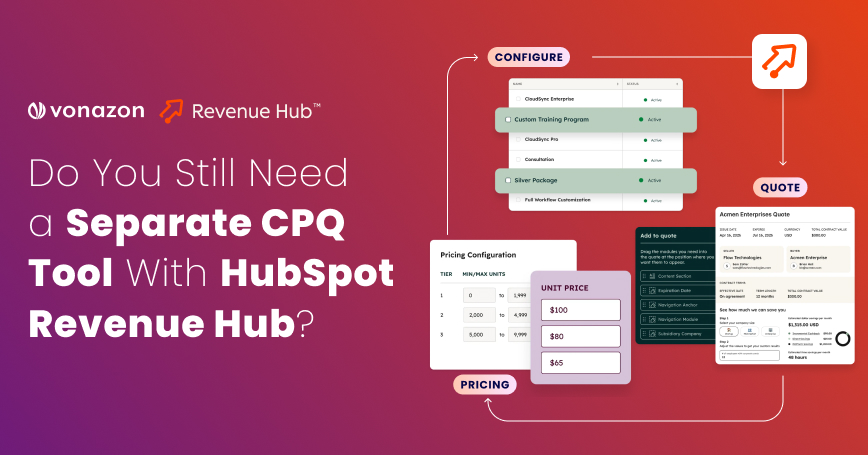
HubSpot Revenue Hub CPQ, part of the platform formerly called Commerce Hub, brings quoting, approvals, contracts, and billing into the CRM. That creates a chance to retire some tools, but a feature list cannot settle the question. Quote complexity and billing needs decide whether native functionality is enough. This article covers what Revenue Hub handles as of October 2026, where a dedicated CPQ system still applies, and how to test the decision.
What does HubSpot Revenue Hub actually handle in the CPQ process?
Revenue Hub covers quoting, pricing, approvals, contracts, and billing from the deal record, but several pieces depend on tier, seat, or beta enrollment. Per HubSpot’s getting started guide for HubSpot CPQ, CPQ requires a Professional or Enterprise subscription and a Revenue Hub seat. The product library supports flat-rate, stair-step, and tiered pricing plus price books. Advanced approvals need Enterprise. The Connected CPQ, Billing, and Payments process is a beta, as are direct contract creation, editing, and renewal.
CPQ requirement | Revenue Hub capability (October 2026) | What to verify |
|---|---|---|
Quote generation | Documented, no beta label; seat required | Template and workflow fit |
Pricing rules | Tiered pricing and price books; quote rules on Enterprise | Exceptions and rule complexity |
Approvals | Standard approvals; property-based advanced approvals on Enterprise | Conditional routing |
Subscription changes | Change and renewal quotes with proration; contract editing in beta | Amendments and proration |
ERP integration | Integration-dependent (QuickBooks, Xero, NetSuite) | Data ownership and sync |
In these cases, one system can mean fewer disconnected tools, less duplicate entry, more consistent CRM-to-quote data, less integration maintenance, and easier sales and finance collaboration. Savings are not automatic. Fewer tools help only when every required workflow is supported. Vonazon’s guide to signs a quote-to-cash process has outgrown its tech stack separates technology gaps from process gaps, a useful first filter.
Where does HubSpot Revenue Hub reduce the need for separate CPQ software?
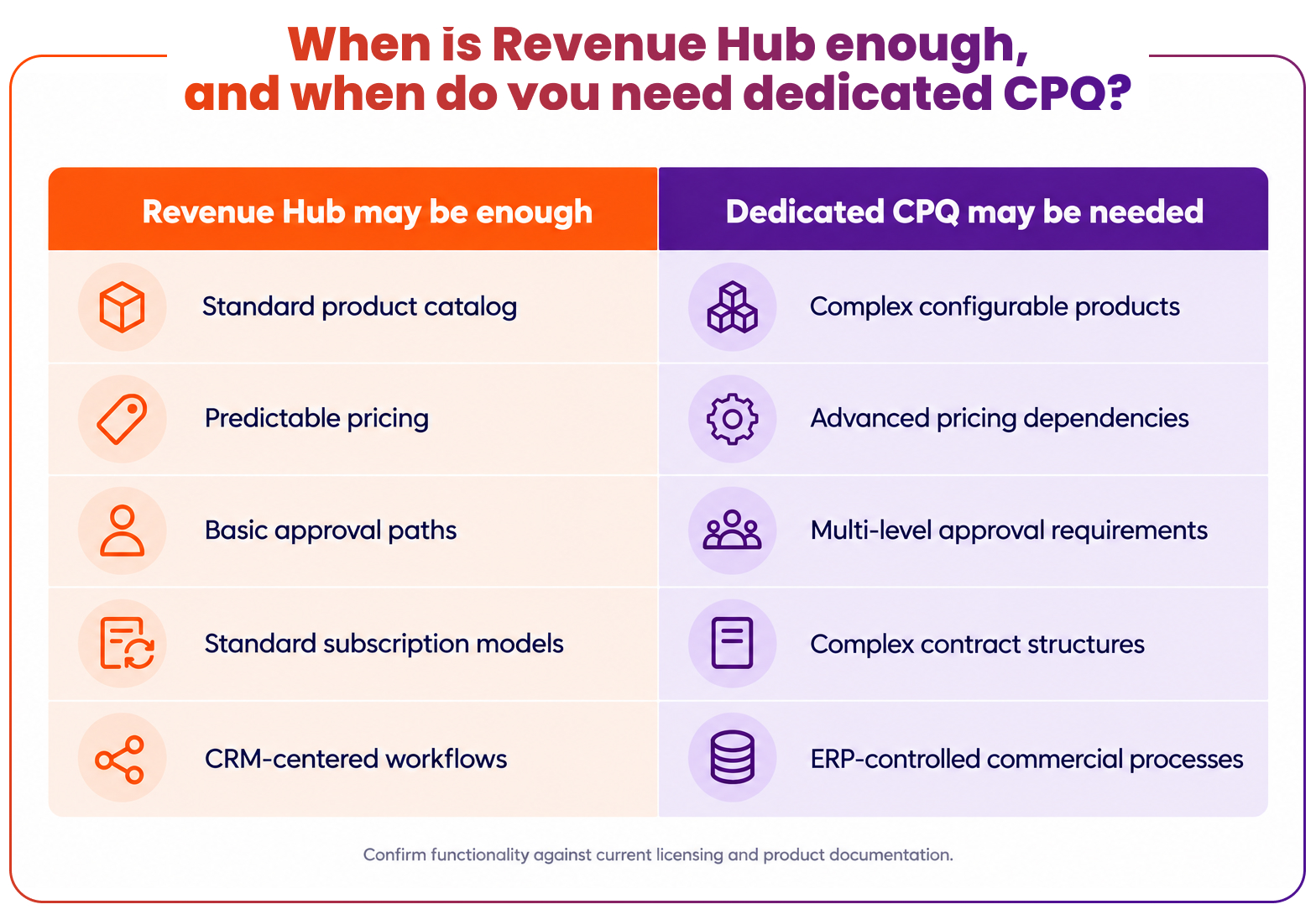
Native functionality may be enough when catalogs, pricing, and approvals follow predictable rules. Four profiles fit:
Four breakdowns turn automation against the revenue number:
- A B2B services company selling fixed packages from a flat-rate product library.
- A SaaS company with a manageable subscription catalog using tiered or ramp pricing.
- A professional services firm applying standard rate cards through price books.
- A sales team whose discount approvals follow set thresholds, such as routing quotes above a dollar amount to a named approver.
In these cases, one system can mean fewer disconnected tools, less duplicate entry, more consistent CRM-to-quote data, less integration maintenance, and easier sales and finance collaboration. Savings are not automatic. Fewer tools help only when every required workflow is supported. Vonazon’s guide to signs a quote-to-cash process has outgrown its tech stack separates technology gaps from process gaps, a useful first filter.
When does a dedicated CPQ tool still make sense?
A dedicated CPQ tool still makes sense when requirements exceed documented Revenue Hub behavior or when another system controls pricing and fulfillment. Six conditions deserve scrutiny:

Product configurations with compatibility dependencies.

Multi-level or highly conditional pricing rules.

Approval workflows across regions or business units.

Contract amendments involving complex subscriptions.

ERP-driven pricing, inventory, and fulfillment.

Multi-entity or multi-region commercial operations.
Each condition needs classification. A limitation is a gap that no setting closes. A requirement that configuration or integration can meet is a project, not a reason to switch. HubSpot documents quote rules on Enterprise that can require or prevent product combinations and set discount limits, so compatibility needs deserve testing before anyone labels them unsupported.
Consider a manufacturer with thousands of product combinations and ERP-dependent pricing. Its pricing source of truth sits outside the CRM. A B2B services firm selling fixed packages has no such dependency. Salesforce’s Revenue Cloud shows how a dedicated platform approaches this end of the market, with a constraint-based configurator, an attribute-based catalog, and order orchestration.
HubSpot Revenue Hub vs. a dedicated CPQ tool: What should you compare?
The comparison should rest on workflow depth and integration effort, not feature counts. Implementation effort, reporting, and data governance deserve the same scrutiny as configuration. Vonazon’s HubSpot integrations service covers the integration planning that either path requires.
Evaluation area | HubSpot Revenue Hub | Dedicated CPQ |
|---|---|---|
Product configuration | Product library, price books, Enterprise quote rules | Varies by product |
Pricing rules | Flat-rate, stair-step, tiered, and ramp pricing | Varies by product |
Approval workflows | Standard approvals; advanced on Enterprise | Varies by product |
Subscription management | Contracts, change and renewal quotes; some features in beta | Varies by product |
ERP integration | Verify integration path | Verify integration path |
Operational complexity | Depends on configuration | Depends on architecture |
What happens when CPQ, CRM, and ERP data do not match?
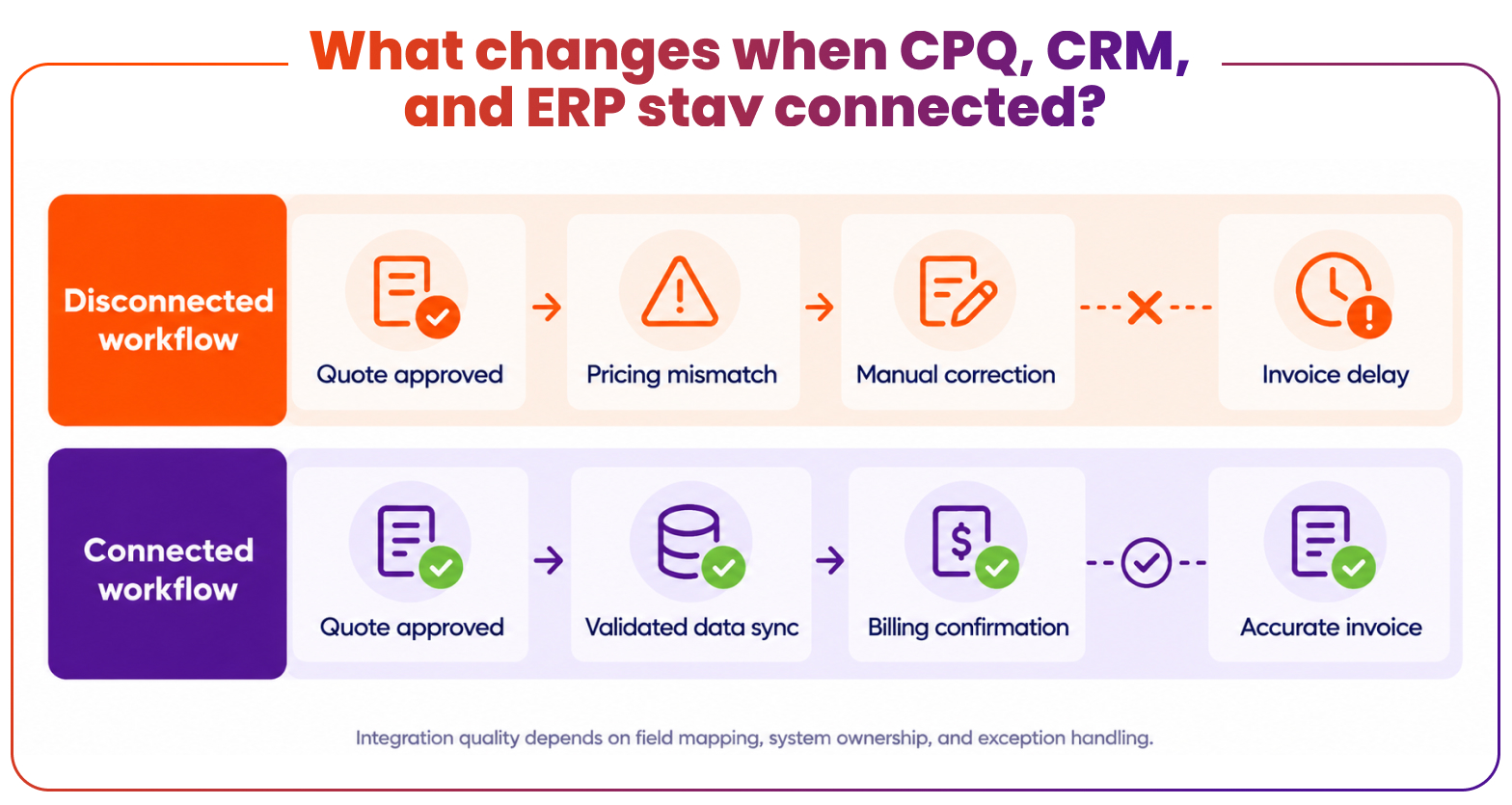
Mismatched data turns small edits into financial errors. A sales representative updates a quote in HubSpot. The revised discount never reaches the ERP, and finance invoices the previous amount.
The consequences compound: incorrect invoices, credit memos, delayed collections, revenue reporting discrepancies, manual reconciliation, and disagreement between sales and finance over which number is correct.
Prevention starts with fields and ownership. Teams need to define which system owns net price, discount, currency, tax, billing contact, and contract dates, and how each change propagates. HubSpot’s revenue management documentation describes syncing contacts, products, invoices, credit memos, and payments with accounting and ERP tools. Vonazon’s case study on integrating HubSpot with Salesforce illustrates bidirectional sync built on shared definitions. A connected architecture matters more than the number of tools.
How can you decide whether to keep or replace your CPQ tool?
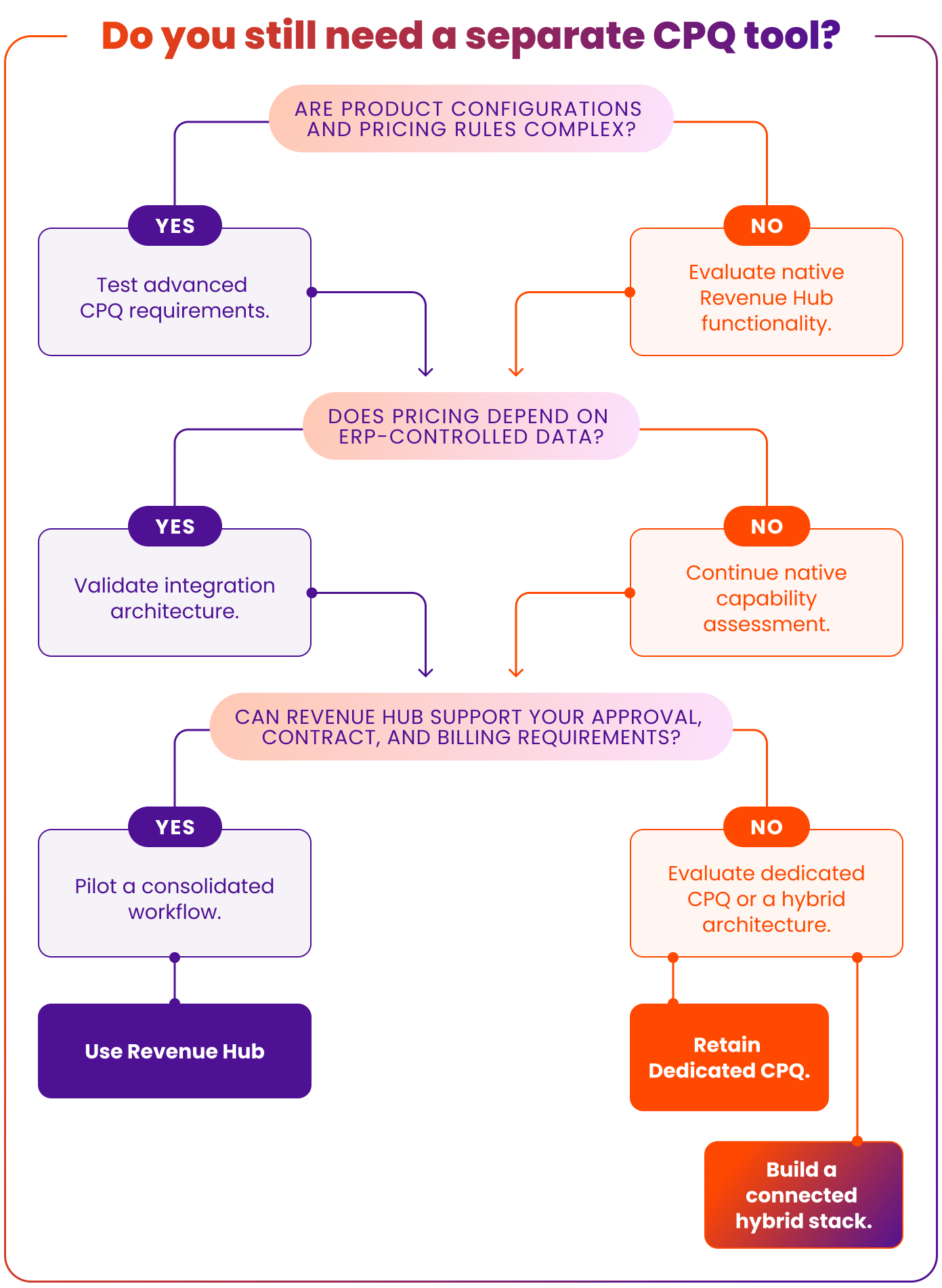
Workflow testing, not feature comparison alone, should drive the decision. Five checkpoints give the process structure:
Review quote complexity.
Identify configurable products, pricing exceptions, bundles, and discount dependencies.
Map approval requirements.
Document conditions, thresholds, and owners.
Inspect downstream dependencies.
Trace how accepted quotes affect contracts, billing, finance, and ERP records.
Validate native functionality.
Test real workflows in a sandbox, and confirm licensing, integrations, and beta status.
Compare total operating cost.
Include licensing, implementation, integration maintenance, training, and administration.
Conclusion: Do you still need a separate CPQ tool with HubSpot Revenue Hub?
Not always. HubSpot Revenue Hub CPQ may remove the need for separate software when pricing, quoting, approvals, and downstream workflows fit its verified native capabilities. Advanced configuration, ERP-driven commercial rules, or complex contract requirements may justify keeping a dedicated system. Real workflows should be tested before the stack changes, since a pilot exposes gaps that feature lists hide.
Not sure whether Revenue Hub can support a quote-to-cash process? Vonazon can help assess the HubSpot setup, integration dependencies, and revenue workflows before a decision to consolidate or retain CPQ tools. Explore Vonazon’s HubSpot Revenue Hub services.
FAQs
Does HubSpot Revenue Hub include CPQ functionality?
Yes. HubSpot lists CPQ inside Revenue Hub, covering the product library, quotes, approvals, and e-signature. CPQ requires a Professional or Enterprise subscription plus a Revenue Hub seat. Advanced approvals and quote rules require Enterprise, and some billing and contract features remain in beta.
Can HubSpot Revenue Hub replace a dedicated CPQ tool?
It can when catalogs, pricing, approvals, and billing fit documented features. Standard subscriptions and tiered pricing are common candidates. Complex configuration, ERP-controlled pricing, or intricate amendments may still call for specialized software. A pilot with real quotes shows which category applies.
What is the difference between HubSpot CPQ and Salesforce CPQ?
HubSpot CPQ sits inside the CRM deal record, while Salesforce now markets its offering as Revenue Cloud, with a constraint-based configurator and order orchestration. Feature depth, administration effort, and licensing differ, so side-by-side testing on real scenarios is more reliable than feature claims.
Does HubSpot CPQ support complex pricing and approval workflows?
HubSpot documents tiered, stair-step, and ramp pricing, price books, and property-based advanced approvals on Enterprise. Quote rules can warn or block quotes. Documentation does not describe deeply nested pricing dependencies or multi-region approval hierarchies, so those scenarios need sandbox testing.
Can HubSpot Revenue Hub integrate with ERP systems?
Yes, through integration. HubSpot’s documentation lists QuickBooks, Xero, and NetSuite syncs using marketplace apps or APIs. Each integration needs defined field ownership, sync rules, and exception handling, so that pricing, invoices, and payment status stay consistent across systems.
How much does HubSpot CPQ cost, and which subscription do you need?
CPQ requires Revenue Hub Professional or Enterprise. HubSpot’s Revenue Hub page lists Professional from $95 per month and Enterprise from $140 per month. Enterprise adds advanced quote approvals and quote rules. A Revenue Hub seat is needed to create quotes.
Map the quote-to-cash path before choosing a CPQ tool
Pricing rules, approvals, contracts, and billing handoffs each affect whether native HubSpot CPQ is enough. Vonazon scopes Revenue Hub projects from process design and data foundations through launch, so the build matches how revenue actually moves.